Showing posts with label Web Services. Show all posts

Getting Started with Simple RMI services

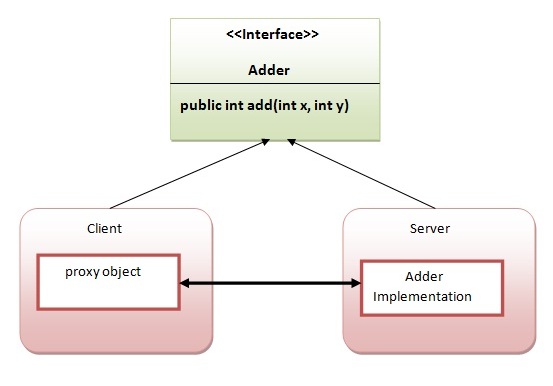
Writing your own RMI services can be a little difficult at first, so we'll start off with an example which isn't too ambitious.In this example, we have followed all the 6 steps to create and run the rmi application. The client application need only two files, remote interface and client application. In the rmi application, both client and server interacts with the remote interface. The client application invokes methods on the
proxy object, RMI sends the request to the remote JVM. The return value is sent back to the proxy object and then to the client application.

The is given the 6 steps to write the RMI program.

1.create the remote interface

An interface is a method which contains abstract methods; these methods must be implemented by another class.For creating the remote interface, extend the Remote interface and declare the RemoteException with all the methods of the remote interface. Here, we are creating a remote interface that extends the Remote interface.

import java.math.BigInteger;
import java.rmi.*;

//
// PowerService Interface
//
// Interface for a RMI service that calculates powers
//
public interface PowerService extends Remote
{
// Calculate the square of a number
public BigInteger square ( int number )
throws RemoteException;

// Calculate the power of a number
public BigInteger power ( int num1, int num2)
throws RemoteException;
}

2) Provide the implementation of the remote interface

Now provide the implementation of the remote interface. For providing the implementation of the Remote interface, we need to
  • Either extend the UnicastRemoteObject class,
  • or use the exportObject() method of the UnicastRemoteObject class
In case, you extend the UnicastRemoteObject class, you must define a constructor that declares RemoteException. Our implementation of the service also needs to have a main method. The main method will be responsible for creating an instance of our PowerServiceServer, and registering (or binding) the service with the RMI Registry. 
Now rmi services need to be hosted in a server process. The Naming class provides methods to get and store the remote object. The Naming class provides 5 methods.

  1. public static java.rmi.Remote lookup(java.lang.String) throws java.rmi.NotBoundException, java.net.MalformedURLException, java.rmi.RemoteException; it returns the reference of the remote object.
  2. public static void bind(java.lang.String, java.rmi.Remote) throws java.rmi.AlreadyBoundException, java.net.MalformedURLException, java.rmi.RemoteException; it binds the remote object with the given name.
  3. public static void unbind(java.lang.String) throws java.rmi.RemoteException, java.rmi.NotBoundException, java.net.MalformedURLException; it destroys the remote object which is bound with the given name.
  4. public static void rebind(java.lang.String, java.rmi.Remote) throws java.rmi.RemoteException, java.net.MalformedURLException; it binds the remote object to the new name.
  5. public static java.lang.String[] list(java.lang.String) throws java.rmi.RemoteException, java.net.MalformedURLException; it returns an array of the names of the remote objects bound in the registry.

import java.math.*;
import java.rmi.*;
import java.rmi.server.*;

//
// PowerServiceServer
//
// Server for a RMI service that calculates powers
//
public class PowerServiceServer extends UnicastRemoteObject
implements PowerService
{
public PowerServiceServer () throws RemoteException
{
super();
}

// Calculate the square of a number
public BigInteger square ( int number )
throws RemoteException
{
String numrep = String.valueOf(number);
BigInteger bi = new BigInteger (numrep);

// Square the number
bi.multiply(bi);

return (bi);
}

// Calculate the power of a number
public BigInteger power ( int num1, int num2)
throws RemoteException
{
String numrep = String.valueOf(num1);
BigInteger bi = new BigInteger (numrep);

bi = bi.pow(num2);

return bi;
}

public static void main ( String args[] ) throws Exception
{
// Create an instance of our power service server ...
PowerServiceServer svr = new PowerServiceServer();

// ... and bind it with the RMI Registry
Naming.bind ("PowerService", svr);

System.out.println ("Service bound....");
}
}


5) Create and run the client application

Writing clients is the easy part - all a client has to do is call the registry to obtain a reference to the remote object, and call its methods. At the client we are getting the stub object by the lookup() method of the Naming class and invoking the method on this object. All the underlying network communication is hidden from view, which makes RMI clients simple. In this example, we are running the server and client applications, You can run the client locally, or from a different machine. In either case, you'll need to specify the hostname of the machine where you are running the server. If you're running it locally, use localhost as the hostname.If you want to access the remote object from another machine, change the localhost to the host name (or IP address) where the remote object is located.

  To identify a service, we specify an RMI URL. The URL contains the hostname on which the service is located, and the logical name of the service. This returns a PowerService instance, which can then be used just like a local object reference. We can call the methods just as if we'd created an instance of the remote PowerServiceServer ourselves.


import java.rmi.*;
import java.rmi.Naming;
import java.io.*;


//
// PowerServiceClient
//

public class PowerServiceClient
{
public static void main(String args[]) throws Exception
{
// Check for hostname argument
if (args.length != 1)
{
System.out.println
("Syntax - PowerServiceClient host");
System.exit(1);
}


// Call registry for PowerService
PowerService service = (PowerService) Naming.lookup
("rmi://" + args[0] + "/PowerService");

DataInputStream din = new
DataInputStream (System.in);

for (;;)
{
System.out.println
("1 - Calculate square");
System.out.println
("2 - Calculate power");
System.out.println
("3 - Exit"); System.out.println();
System.out.print ("Choice : ");

String line = din.readLine();
Integer choice = new Integer(line);

int value = choice.intValue();

switch (value)
{
case 1:
System.out.print ("Number : ");
line = din.readLine();System.out.println();
choice = new Integer (line);
value = choice.intValue();

// Call remote method
System.out.println
("Answer : " + service.square(value));

break;
case 2:
System.out.print ("Number : ");
line = din.readLine();
choice = new Integer (line);
value = choice.intValue();

System.out.print ("Power : ");
line = din.readLine();
choice = new Integer (line);
int power = choice.intValue();

// Call remote method
System.out.println
("Answer : " + service.power(value, power));

break;
case 3:
System.exit(0);
default :
System.out.println ("Invalid option");
break;
}
}
}
}

Steps To Test

1) compile all the java files 

javac *.java  
 
2)create stub and skeleton object by rmic tool 
 
rmic PowerServiceServer 
 
3)start rmi registry in one command prompt 
 
rmiregistry 5000  
 
4)start the server in another command prompt 
 
java PowerServiceServer 
 
5)start the client application in another command prompt 
 
java PowerServiceClient localhost 


Output


References

JAVA Remote Method Invocation (RMI)

Remote method invocation allows applications to call object methods located remotely, sharing resources and processing load across systems. Unlike other systems for remote execution which require that only simple data types or defined structures be passed to and from methods, RMI allows any Java object type to be used - even if the client or server has never encountered it before. RMI allows both client and server to dynamically load new object types as required.

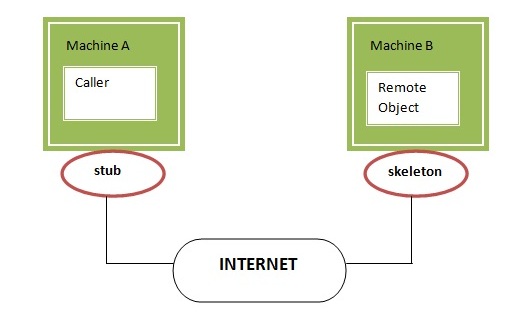
RMI uses stub and skeleton object for communication with the remote object.
A remote object is an object whose method can be invoked from another JVM. JVMs can be located on separate computers - yet one JVM can invoke methods belonging to an object stored in another JVM. Methods can even pass objects that a foreign virtual machine has never encountered before, allowing dynamic loading of new classes as required. This is a powerful feature! Let's understand the stub and skeleton objects:

stub

The stub is an object, acts as a gateway for the client side. All the outgoing requests are routed through it. It resides at the client side and represents the remote object. When the caller invokes method on the stub object, it does the following tasks:
  1. It initiates a connection with remote Virtual Machine (JVM),
  2. It writes and transmits (marshals) the parameters to the remote Virtual Machine (JVM),
  3. It waits for the result
  4. It reads (unmarshals) the return value or exception, and
  5. It finally, returns the value to the caller.

skeleton

The skeleton is an object, acts as a gateway for the server side object. All the incoming requests are routed through it. When the skeleton receives the incoming request, it does the following tasks:
  1. It reads the parameter for the remote method
  2. It invokes the method on the actual remote object, and
  3. It writes and transmits (marshals) the result to the caller.

Consider the follow scenario :
  • Developer A writes a service that performs some useful function. He regularly updates this service, adding new features and improving existing ones.
  • Developer B wishes to use the service provided by Developer A. However, it's inconvenient for A to supply B with an update every time.


Java RMI provides a very easy solution! Since RMI can dynamically load new classes, Developer B can let RMI handle updates automatically for him. Developer A places the new classes in a web directory, where RMI can fetch the new updates as they are required.

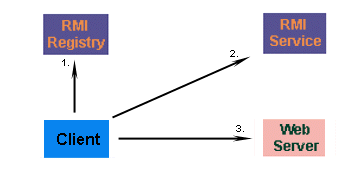
Firstly, the client must contact an RMI registry, and request the name of the service. Developer B won't know the exact location of the RMI service, but he knows enough to contact Developer A's registry. This will point him in the direction of the service he wants to call..

Developer A's service changes regularly, so Developer B doesn't have a copy of the class. Not to worry, because the client automatically fetches the new subclass from a webserver where the two developers share classes. The new class is loaded into memory, and the client is ready to use the new class. This happens transparently for Developer B - no extra code need to be written to fetch the class.

References

Study About Enterprise Java Beans (EJB) Introduction

Enterprise Java Beans (EJB) is a development architecture for building highly scalable and robust enterprise level applications to be deployed on J2EE compliant Application Server such as JBOSS, Web Logic etc.

A recent study by Java developer Raghu Kodali has shown that porting Sun's Java EE tutorial application RosterApp from EJB 2.1 to EJB 3.0 resulted in
more than a 50-percent reduction in code and The development of EJB 3 is faster than EJB 2 because of simplicity and annotations such as @EJB, @Stateless, @Stateful, @ModelDriven, @PreDestroy, @PostConstruct etc.

An EJB application can be deployed on any of the application server such as Jboss, Glassfish, Weblogic, Websphere etc compliant with J2EE 1.3 standard specification.It performs:
  • life cycle management,
  • security,
  • transaction management, and
  • object pooling.
EJB are primarily of three types which are briefly described below:

TypeDescription
Session BeanSession bean contains business logic that can be invoked by local, remote or web service client. It can be stateful or stateless. It is less resource intensive as compared to entity beans. Session bean gets destroyed as soon as user session terminates.
Entity BeanEntity beans represents persistent data storage. User data can be saved to database via entity beans and later on can be retrieved from the database in the entity bean.It is deprecated. Now, it is replaced with JPA (Java Persistent API).
Message Driven BeanMessage driven beans are used in context of JMS (Java Messaging Service). Message Driven Beans can consumes JMS messages from external entities and act accordingly.


References

Getting Started with Simple Apache Abdera Server

Apache Abdera provides an implementation of the IETF Atom Syndication Format and Atom Publishing Protocol standards (RFC's 4287 and 5023). In this blog we're going to walk through how to build an Atom Publishing Protocol service server sample using Abdera's concepts of Providers and Collection Adapters. If you remember your AtomPub basics, you'll recall that AtomPub services are organized in a hierarchical way such that we have:

  • Services - A grouping of Workspaces
  • Workspace - A grouping of Collections
  • Collections - An Atom Feed which contains Atom entries. Entries can be created, deleted, updated, etc through the HTTP methods and the mapping that AtomPub defines.

    Let's start to build a simple Abdera server sample for our Testing. So create a simple java project in your IDE and add below dependencies in your pom file to provide server function and abdera libraries.

    pom.xml

    <project xmlns="http://maven.apache.org/POM/4.0.0" xmlns:xsi="http://www.w3.org/2001/XMLSchema-instance"
    xsi:schemaLocation="http://maven.apache.org/POM/4.0.0 http://maven.apache.org/xsd/maven-4.0.0.xsd">
    <modelVersion>4.0.0</modelVersion>

    <groupId>com.atomfeed.connector</groupId>
    <artifactId>ATOMPubServer</artifactId>
    <version>1.0.0</version>
    <packaging>jar</packaging>

    <name>ATOMPubServer</name>
    <url>http://maven.apache.org</url>

    <properties>
    <project.build.sourceEncoding>UTF-8</project.build.sourceEncoding>
    </properties>

    <dependencies>
    <dependency>
    <groupId>junit</groupId>
    <artifactId>junit</artifactId>
    <version>3.8.1</version>
    <scope>test</scope>
    </dependency>
    <dependency>
    <groupId>org.mortbay.jetty</groupId>
    <artifactId>jetty-maven-plugin</artifactId>
    <version>7.4.5.v20110725</version>
    </dependency>
    <dependency>
    <groupId>org.apache.abdera</groupId>
    <artifactId>abdera-server</artifactId>
    <version>1.1.2</version>
    </dependency>
    </dependencies>
    </project>


    Let's begin our code with the setting up the URL Space since we are using jetty server for our sample we need to initialize the sever and service url for our service which we are creating.


    In this code we're setting up a Provider which contains an Atom workspace which contains our Atom collection.
    When we initialize our CollectionAdapter we call setHref. Abdera uses this to determine the URL space

    App.java


    package com.atomfeed.connector.server;

    import org.apache.abdera.protocol.server.Provider;
    import org.apache.abdera.protocol.server.impl.DefaultProvider;
    import org.apache.abdera.protocol.server.impl.SimpleWorkspaceInfo;
    import org.apache.abdera.protocol.server.servlet.AbderaServlet;
    import org.eclipse.jetty.server.Server;
    import org.eclipse.jetty.servlet.ServletContextHandler;
    import org.eclipse.jetty.servlet.ServletHolder;

    import java.io.IOException;
    import javax.servlet.ServletException;
    import javax.servlet.http.HttpServletRequest;
    import javax.servlet.http.HttpServletResponse;

    public class App {

    public static void main(String... args) throws Exception {
    int port = 9002;
    try {
    port = args.length > 0 ? Integer.parseInt(args[0]) : 9002;
    } catch (Exception e) {
    }
    Server server = new Server(port);
    ServletContextHandler context = new ServletContextHandler(server, "/", ServletContextHandler.SESSIONS);
    ServletHolder servletHolder = new ServletHolder(new EmployeeProviderServlet());
    context.addServlet(servletHolder, "/*");
    server.start();
    server.join();
    }

    public static final class EmployeeProviderServlet extends AbderaServlet {
    @Override
    protected Provider createProvider() {
    EmployeeCollectionAdapter ca = new EmployeeCollectionAdapter();
    ca.setHref("FeedConnector");

    SimpleWorkspaceInfo wi = new SimpleWorkspaceInfo();
    wi.setTitle("Feed Update");
    wi.addCollection(ca);

    DefaultProvider provider = new DefaultProvider("/");
    provider.addWorkspace(wi);

    provider.init(getAbdera(), null);
    return provider;
    }

    @Override
    protected void service(HttpServletRequest request, HttpServletResponse response) throws ServletException, IOException {

    super.service(request, response);
    }

    }
    }


    Abdera comes with a class called the AbstractEntityCollectionAdapter. This class provides a simple "fill in the blanks" approach so that you can easily map your concepts to an AtomPub collection. The idea is that you have an entity class which represents each individual entry. For instance, if you were writing a blog, you would have a BlogEntry class which backs the entry. Or in our case of an employee directory, it would be an Employee class. Abdera will then provide some template methods which you fill in to give Abdera the necessary metadata.
    Our Atom Collection is going to be a simple store of employees which can be added to, deleted from, updated, etc. To get started, we must first build our Employee class:
    package com.atomfeed.connector.server;

    import java.util.Date;


    public class Employee {
    private int id;
    private String Content;
    private String title;
    private Date updated;

    public int getId() {
    return id;
    }

    public void setId(int id) {
    this.id = id;
    }

    public String getContent() {
    return Content;
    }

    public void setContent(String Content) {
    this.Content = Content;
    }

    public Date getUpdated() {
    return updated;
    }

    public void setUpdated(Date updated) {
    this.updated = updated;
    }

    public void settitle(String title) {
    this.title = title;
    }

    public String gettitle() {

    return title;
    }
    }

    The ID is going to be used as a unique identifier for our Employee so that even if the employee's name changes, we can tie it to a previous atom entry and track the changes. The updated date will be used for our Atom feed, so that consumers know if there were changes and when they occurred. when we check the last updated date this is the information we are going to check to receive the last updated news feeds.

    The first thing we'll do is provide a hashmap to store our Employees in. Typically this will be a database or some other type of backend store. To keep things simple, we're going to store employees in a Map according to their employee id.
    Next up, we need to implement some methods which provide some basic metadata about our collection such as the feed author, the feed ID, and the feed title:
    The ID in getId(RequestContext) must be a unique identifier for your feed. The idea is that even if your feed location changes, or someone is redistributing your feed, the feed reader can use this ID to identify that two feeds are the exact same. For information on how to construct feed IDs and why they matter, its recommend that you use this article on how to create feed ids.
    Walking through this we have:
    • getId: this ID will uniquely identify your entry. It follows the same rules as the feed ID.
    • getTitle: The title of this entry.
    • getUpdated: The time this entry was last updated.
    • getAuthors: the author of this entry. It is ok to leave this empty provided that there is an author supplied for the feed.
    • getContent: The actual content of this entry that will be displayed in the feed. In this case it is just the employee name. You can return a Content or String object from this method. Using the Content object allows you to have control over whether or not the content is rendered as HTML. Alternatively you could provider a summary by overriding getSummary. You must have at least one of the getContent or getSummary methods not return null.

      Mapping Entries to Resources

      The AbstractEntityCollectionAdapter maps individual entries via a "resource name." You must provide a way to create a resource name for your entry and also provide a way to look up an entry from your resource name. In this case, our entry is an Employee.

      When we do this we must ensure that we won't have conflicts. Which means we don't want to use the employee name as the unique resource name as there may be conflicts. However we don't necessarily want to use just the employee ID either as the URL isn't very friendly. So we'll create a hybrid of the form: "EMPLOYEE_ID-EMPLOYEE_NAME".


       Note the use of the sanitizer. This will take any invalid characters for a URL and either strip or replace them from the string.
      The POST method corresponds to creating an Employee in the database. Here we're:
      • Creating a new Employee object
      • Creating a new id for it
      • Setting the name of the Employee from the Content. In a more advanced case, you woudl want to store the Employee information in an XML structure or an HTML microformat.
      • Store the Employee in our HashMap.

        The putEntry method is similar. In this case we're just updating the employee name.

        Finally, we have the deleteEntry method which gives us the resource name and allows us to remove it from the Map.

        package com.atomfeed.connector.server;

        import java.util.Arrays;
        import java.util.Date;
        import java.util.HashMap;
        import java.util.List;
        import java.util.Map;
        import java.util.concurrent.atomic.AtomicInteger;

        import org.apache.abdera.Abdera;
        import org.apache.abdera.factory.Factory;
        import org.apache.abdera.i18n.iri.IRI;
        import org.apache.abdera.model.Content;
        import org.apache.abdera.model.Person;
        import org.apache.abdera.protocol.server.RequestContext;
        import org.apache.abdera.protocol.server.context.ResponseContextException;
        import org.apache.abdera.protocol.server.impl.AbstractEntityCollectionAdapter;


        public class EmployeeCollectionAdapter extends AbstractEntityCollectionAdapter<Employee> {
        private static final String ID_PREFIX = "tag:wso2.com,2015,feed:entry:";

        private AtomicInteger nextId = new AtomicInteger(1000);
        private Map<Integer, Employee> employees = new HashMap<Integer, Employee>();
        private Factory factory = new Abdera().getFactory();

        @Override
        public String getId(RequestContext request) {
        return "tag:wso2.com,2015,feed:entry:";
        }

        public String getTitle(RequestContext request) {
        return "Feed Connector feeds";
        }

        @Override
        public String getAuthor(RequestContext request) {
        return "WSO2 Inc";
        }

        @Override
        public Iterable<Employee> getEntries(RequestContext request) {
        return employees.values();
        }

        @Override
        public Employee getEntry(String resourceName, RequestContext request) throws ResponseContextException {
        Integer id = getIdFromResourceName(resourceName);
        return employees.get(id);
        }

        private Integer getIdFromResourceName(String resourceName) throws ResponseContextException {
        int idx = resourceName.indexOf("-");
        if (idx == -1) {
        throw new ResponseContextException(404);
        }
        return new Integer(resourceName.substring(0, idx));
        }

        @Override
        public String getName(Employee entry) {
        return entry.getId() + "-" + entry.gettitle().replaceAll(" ", "_");
        }

        @Override
        public String getId(Employee entry) {
        return ID_PREFIX + entry.getId();
        }

        @Override
        public String getTitle(Employee entry) {
        return entry.gettitle();
        }

        @Override
        public Date getUpdated(Employee entry) {
        return entry.getUpdated();
        }

        @Override
        public List<Person> getAuthors(Employee entry, RequestContext request) throws ResponseContextException {
        Person author = request.getAbdera().getFactory().newAuthor();
        author.setName("WOS2 Inc");
        return Arrays.asList(author);
        }

        @Override
        public Object getContent(Employee entry, RequestContext request) {
        Content content = factory.newContent(Content.Type.TEXT);
        content.setText(entry.gettitle());
        return content;
        }

        @Override
        public Employee postEntry(String title,
        IRI id,
        String summary,
        Date updated,
        List<Person> authors,
        Content content,
        RequestContext request) throws ResponseContextException {
        Employee employee = new Employee();
        employee.setContent(content.getText().trim());
        employee.setId(nextId.getAndIncrement());
        employee.settitle(title);
        employee.setUpdated(updated);
        employees.put(employee.getId(), employee);

        return employee;
        }

        @Override
        public void putEntry(Employee employee,
        String title,
        Date updated,
        List<Person> authors,
        String summary,
        Content content,
        RequestContext request) throws ResponseContextException {
        employee.settitle(content.getText().trim());
        }

        @Override
        public void deleteEntry(String resourceName, RequestContext request) throws ResponseContextException {
        Integer id = getIdFromResourceName(resourceName);
        employees.remove(id);
        }
        }


        After complete  the development just run the application as java application you will see the console output as


        2015-10-19 11:33:16.825:INFO::jetty-7.4.5.v20110725
        2015-10-19 11:33:16.862:INFO::started o.e.j.s.ServletContextHandler{/,null}
        2015-10-19 11:33:16.985:INFO::Started SelectChannelConnector@0.0.0.0:9002 STARTING


        Later we can check the the output for this server after build a client for this sever now you can download full source code and can contribute for the further development of this Source Code

        References

        Implement a service - order processing service using Axis2 Web Service and WSO2 Developer Studio (Eclipse)

         Lets Build a Simple Order Process Service Sample System Based on the Previous Sample I run in the WSO2 Developer Studio  So as usual in order run this Project we need Requirements if your a web services Developer then you no need to worry about extra Dependencies and other Downloads if your using WSO2 Developer Studio Because WSO2 Studio have all requirements for Develop web Services .I'm also new to Web Services Development so WSO2 Developer Studio reduce my other works except Service Development 

          In this post I'm going to explain How to Build a Simple Order Process Service System Using Eclipse , Axis2 and Apache Tomcat the System will Work Like Below One . So here First its Ask the Options to List what are the Menu Items Available in the Restaurant and if your Regular customer you can order Directly through type 2 and item number (eg:- 2 itemNo 015 for order Koddu)   and we can order more item one by one so after Order we just Press 4 and Card Credentials (eg:- 4 CNo 123456789 PNo 123)  in this case if your credentials valid and your card have a enough amount you will get success message 


        ###################################################################
        ######### Welcome to Order Process Service Sample testing #########
        ###################################################################

         To list All Available Menu Items                           Press 1
         To Order a Item      Press 2 and Type itemNo and Your orderig Item
         To list The Bill                                           Press 3
         To exit type -1

        Type your request Here : 1

        Item Number      Item Name      Item Prize
        10         Tea         50
        25         Piddu         15

        13         Rice         350
        015         Koddu         510
        12         Pizza         500

         To list All Available Menu Items                           Press 1
         To Order a Item      Press 2 and Type itemNo and Your orderig Item
         To list The Bill                                           Press 3
         To exit type -1

        Type your request Here : 2 itemNo 015

        Item Number      Item Name      Item Prize
        015         Koddu         510

        Total Amount to pay is :Rs 510/=

         To list All Available Menu Items                           Press 1
         To Order a Item      Press 2 and Type itemNo and Your orderig Item
         To list The Bill                                           Press 3
         To Pay a Bill Press 4 and Type CNo yoursCardNumber and PNo YoursPinNumber


        Type your request Here : 2 itemNo 12

        Item Number      Item Name      Item Prize
        015         Koddu         510
        12         Pizza         500

        Total Amount to pay is :Rs 1520/=

         To list All Available Menu Items                           Press 1
         To Order a Item      Press 2 and Type itemNo and Your orderig Item
         To list The Bill                                           Press 3
         To Pay a Bill Press 4 and Type CNo yoursCardNumber and PNo YoursPinNumber

        Type your request Here : 4 CNo 123456789 PNo 123
        Successfully Bill Payed
         WelCome Back Again


        Please Refer Library Project Before Try this project is to understand the Basic concept of Creating New project and learn how is Running

        System Requirement
        These are the tools used in the tutorial.
        1) Java Development Kit  (Download)
        2) WSO2 Developer Studio (Download)
        3) Apache Tomcat (Download)

         First We need to Configure Java_HOME and TOMCAT_HOME and Path also

        JAVA_HOME :- Set the value to jdk directory (export JAVA_HOME=/home/rajjaz/Documents/jdk1.8.0_45)
        TOMCAT_HOME :- Set the value to top level directory of your Tomcat install (export TOMCAT_HOME=/home/rajjaz/Documents/apache-tomcat-6.0.44)PATH :- Set the value to bin directory of your jdk (eexport PATH=$JAVA_HOME/bin:$PATH)


        Create A Project

        As we created Library Project in our Previous Post Here we Need to Create New Dynamic Web Project in the Name of OrderProcessSystem
        and Create New 2 Packages into the Project called OrderProcess , OrderProcess.bean in the Java Resources Folder


        Now It shout be in the above Format.

        Step 1 Writing the Code

        In This Project we are going to use some Constants in Multiple Place so in order to Reduce the Variable name Complexity I'm going to keep common or  Variables are used in service in a separate class Called OrderServiceConstants.Java


        1
        2
        3
        4
        5
        6
        7
        8
        9
        package OrderProcess;

        public interface OrderServiceConstants {
        String AVAILABLE_ITEMS= "availableItems";
        String ALL_ITEMS = "allItemList";
        String ORDERED_ITEMS = "orderedItems";
        String CARD_LIST = "card";
        String CARD_BALANCE = "cardBalance";
        }

        These are the Constants we are going to use in Multiple places so keep it in separate file. Other then that we need to Initialize Some other Values also in this scenario we are going to handle with the Menu Items and Payment Cards so Let's write a Method to Handle With these

        So First Lets Start From Menu Items So Create a New Class File into OrderProcess.bean Package Called MenuItems.java File


         1
        2
        3
        4
        5
        6
        7
        8
        9
        10
        11
        12
        13
        14
        15
        16
        17
        18
        19
        20
        21
        22
        23
        24
        25
        26
        27
        28
        29
        30
        31
        32
        33
        34
        35
        36
        37
        38
        39
        package OrderProcess.bean;

        import org.apache.axiom.om.OMElement;
        import org.apache.axiom.om.OMFactory;

        public class MenuItems {

        private String itemname;
        private String prize;
        private String itemnumber;

        public String getitemName() {
        return itemname;
        }

        public void setitemName(String itemname) {
        this.itemname = itemname;
        }

        public String getPrize() {
        return prize;
        }

        public void setPrize(String itemname) {
        this.prize = itemname;
        }

        public String getItemNo() {
        return itemnumber;
        }

        public void setItemNo(String itemnumber) {
        this.itemnumber = itemnumber;
        }

        public OMElement serialize(OMFactory fac) {
        return null;
        }
        }

        Here we are Declaring Methods in Menu Items Object to handle with Menu Items Attribute Item Name, Item Number and Item Prize

        OK.Now we need to Define Actions with this Menu Item So Let's Create new Class Called MenuItemList.Java For Define the Actions Related with Menu Items in the same Package


         1
        2
        3
        4
        5
        6
        7
        8
        9
        10
        11
        12
        13
        14
        15
        16
        17
        18
        19
        20
        21
        22
        23
        24
        25
        26
        27
        28
        29
        30
        31
        32
        33
        34
        35
        36
        37
        38
        39
        40
        41
        42
        43
        44
        45
        46
        47
        48
        49
        50
        51
        52
        53
        54
        55
        56
        57
        58
        59
        60
        61
        62
        63
        64
        65
        66
        67
        68
        69
        70
        71
        72
        73
        74
        75
        76
        77
        78
        79
        80
        81
        82
        83
        package OrderProcess.bean;

        import org.apache.axiom.om.OMElement;
        import org.apache.axiom.om.OMFactory;

        import java.util.HashMap;
        import java.util.Iterator;

        public class MenuItemList {

        private HashMap itemTable;
        private String listName;

        public MenuItemList(String listName) {
        this.itemTable = new HashMap();
        this.listName = listName;
        }

        public void addItem(MenuItems menuItems) {
        //Method to add the items in the particular ListName
        itemTable.put(menuItems.getItemNo().trim(), menuItems);
        }

        public MenuItems getItem(String itemNo) {
        //Method to Return a Item With the Given Item Number
        return (MenuItems) itemTable.get(itemNo.trim());
        }


        public HashMap getItemTable() {
        //to return a Item table
        return itemTable;
        }

        public void setItemTable(HashMap itemtable) {
        //Assign a List of Tables to New Table
        this.itemTable = itemtable;
        }

        public String getListName() {
        //Get the Name of the List
        return listName;
        }

        public void setListName(String listName) {
        //Set the Name to the List
        this.listName = listName;
        }

        public OMElement serialize(OMFactory fac) {
        return null;
        }

        public MenuItems[] getItemList() {
        //Creating New Array From itemTable hashmap
        MenuItems [] items = new MenuItems[itemTable.size()];
        Iterator items_itr = itemTable.values().iterator();
        int count = 0;
        while (items_itr.hasNext()) {
        items[count] = (MenuItems) items_itr.next();
        //Storing Values into array
        count ++;
        }
        return items;
        }

        public MenuItemList copy() {
        //add values into hashmap in the form of MenuItem Object
        MenuItemList items = new MenuItemList(getListName());
        MenuItems [] allItems = getItemList();
        for (int i = 0; i < allItems.length; i++) {
        MenuItems allItem = allItems[i];
        MenuItems menuItems = new MenuItems();
        menuItems.setPrize(allItem.getPrize());
        menuItems.setItemNo(allItem.getItemNo());
        menuItems.setitemName(allItem.getitemName());
        items.addItem(menuItems);
        }
        return items;
        }
        }

        In the Above Class We are Writing Some Methods Related with Menu Items Actions. Specially getItemList and copy Methods.


         1
        2
        3
        4
        5
        6
        7
        8
        9
        10
        11
        12
        13
        14
        15
        16
        17
        18
        19
        20
        21
        22
        23
        24
        25
        26
        27
        28
        29
        30
        31
        32
        33
        34
        35
        36
        37
        38
        39
        40
        41
        package OrderProcess.bean;

        public class Card {
        private String cardNo;
        private String cardBal;
        private String pinNo;

        public Card() {
        }

        public Card(String cardNo, String pinNo , String cardBal) {
        this.cardNo = cardNo;
        this.cardBal = cardBal;
        this.pinNo = pinNo;
        }

        public String getPinNo() {
        return pinNo;
        }

        public void setPinNo(String PinNo) {
        this.pinNo = PinNo;
        }

        public String getcardNo() {
        return cardNo;
        }

        public void setCardNo(String cardNo) {
        this.cardNo = cardNo;
        }


        public String getCardBal() {
        return cardBal;
        }

        public void setCardBal(String cardBal) {
        this.cardBal = cardBal;
        }
        }


         1
        2
        3
        4
        5
        6
        7
        8
        9
        10
        11
        12
        13
        14
        15
        16
        17
        18
        19
        20
        21
        22
        23
        24
        25
        26
        27
        28
        29
        30
        31
        32
        33
        34
        35
        36
        37
        38
        39
        40
        41
        42
        43
        44
        45
        46
        47
        48
        49
        50
        51
        52
        53
        54
        55
        56
        57
        58
        59
        60
        61
        package OrderProcess.bean;

        import org.apache.axis2.AxisFault;
        import org.apache.commons.logging.Log;
        import org.apache.commons.logging.LogFactory;

        import OrderProcess.OrderServiceLifeCycle;

        import java.util.HashMap;
        import java.util.Iterator;

        public class CardList {
        private HashMap<String, Card> cardList;
        private HashMap<String, Card> cardHolder;

        private static final Log log = LogFactory.getLog(CardList.class);

        public CardList() {
        this.cardList = new HashMap<String, Card>();
        cardHolder = new HashMap<String, Card>();
        }

        public void addUser(Card card) throws AxisFault {
        if (cardList.get(card.getcardNo().trim()) != null) {
        throw new AxisFault("User has already registered.");
        }
        cardList.put(card.getcardNo(), card);
        }

        public boolean billPay(String cardNo, String pinNo, String total) throws AxisFault {
        Card card = cardList.get(cardNo.trim());
        if (card == null) {
        throw new AxisFault("user has not registerd");
        }
        if (card.getPinNo().equals(pinNo)) {
        cardHolder.put(cardNo, card);
        if(Integer.parseInt(card.getCardBal())>=Integer.parseInt(total)){
        card.setCardBal(String.valueOf(Integer.parseInt(card.getCardBal())-Integer.parseInt(total)));
        cardList.put(card.getcardNo(), card);
        return true;
        }
        else{
        throw new AxisFault("Check Your Balance");
        }

        } else {
        throw new AxisFault("Invalid Card Number , Pin Number incorrect");
        }
        }

        public Card[] getUsers() {
        Card [] users = new Card[cardList.size()];
        Iterator users_itr = cardList.values().iterator();
        int count = 0;
        while (users_itr.hasNext()) {
        users[count] = (Card) users_itr.next();
        count ++;
        }
        return users;
        }
        }

        2nd Step


        ServiceLifeCycle

        When you want to initialize database connections , starting threads and etc.. at the time you deploy service. You need to implement this interface and add additional (optional) attribute into services.xml.

        void startUp:
        this will be called during the deployement time of the service. irrespective of the service scope this method will be called

        void shutDown
        this will be called during the system shut down time. irrespective of the service scope this method will be called


        As Mentioned in the Formal Definition for ServiceLifeCycle Here We need to Initialize Our Connection also its mean we have our Data in Service.xml file so we need to load data into system before system start to work so ServiceLIfeCycle Method used to load the Prerequirements before system Come to the Action . Let's see about our OrderServiceLifeCycle.Java Structure and How it's Modified for Order Process Service


          1
        2
        3
        4
        5
        6
        7
        8
        9
        10
        11
        12
        13
        14
        15
        16
        17
        18
        19
        20
        21
        22
        23
        24
        25
        26
        27
        28
        29
        30
        31
        32
        33
        34
        35
        36
        37
        38
        39
        40
        41
        42
        43
        44
        45
        46
        47
        48
        49
        50
        51
        52
        53
        54
        55
        56
        57
        58
        59
        60
        61
        62
        63
        64
        65
        66
        67
        68
        69
        70
        71
        72
        73
        74
        75
        76
        77
        78
        79
        80
        81
        82
        83
        84
        85
        86
        87
        88
        89
        90
        91
        92
        93
        94
        95
        96
        97
        98
        99
        100
        101
        102
        103
        104
        105
        106
        107
        108
        109
        110
        111
        112
        113
        114
        115
        116
        117
        118
        119
        120
        121
        122
        123
        124
        125
        126
        127
        128
        129
        130
        131
        132
        133
        134
        135
        136
        137
        138
        139
        140
        141
        142
        143
        144
        145
        146
        147
        148
        149
        150
        151
        152
        153
        154
        155
        156
        157
        158
        159
        160
        161
        162
        163
        164
        165
        166
        167
        168
        169
        170
        171
        172
        173
        174
        package OrderProcess;

        import org.apache.axiom.om.OMAbstractFactory;
        import org.apache.axiom.om.OMElement;
        import org.apache.axiom.om.OMFactory;
        import org.apache.axiom.om.impl.builder.StAXOMBuilder;
        import org.apache.axiom.om.util.StAXUtils;
        import org.apache.axis2.AxisFault;
        import org.apache.axis2.context.ConfigurationContext;
        import org.apache.axis2.databinding.utils.BeanUtil;
        import org.apache.axis2.description.AxisService;
        import org.apache.axis2.description.Parameter;
        import org.apache.axis2.engine.DefaultObjectSupplier;
        import org.apache.axis2.engine.ServiceLifeCycle;
        import org.apache.commons.logging.Log;
        import org.apache.commons.logging.LogFactory;

        import OrderProcess.bean.MenuItems;
        import OrderProcess.bean.MenuItemList;
        import OrderProcess.bean.Card;
        import OrderProcess.bean.CardList;

        import javax.xml.namespace.QName;
        import javax.xml.stream.XMLStreamReader;

        import java.io.*;
        import java.util.Iterator;

        public class OrderServiceLifeCycle implements ServiceLifeCycle {
        private static final Log log = LogFactory.getLog(OrderServiceLifeCycle.class);

        public void startUp(ConfigurationContext configctx,
        AxisService service) {
        try {
        String tempDir = System.getProperty("java.io.tmpdir");
        File tempFile = new File(tempDir);
        File libFile = new File(tempFile, "OrderProcess.xml");
        //creating temporary files for saving the data
        OMElement OrderElement;
        OMElement cardElement;
        boolean noFile = true;
        if (!libFile.exists()) {
        //Service starting at the first time or user has clean the temp.dir
        //if file not already available
        Parameter allItems = service.getParameter(OrderServiceConstants.ALL_ITEMS);
        //read the values with the above parameter name
        OrderElement = allItems.getParameterElement();
        //Library OMElement Successfully created
        } else {
        //if file already created one then start to read the existing file instead of service.xml
        InputStream in = new FileInputStream(libFile);
        XMLStreamReader xmlReader = StAXUtils
        .createXMLStreamReader(in);
        StAXOMBuilder staxOMBuilder = new StAXOMBuilder(xmlReader);
        OrderElement = staxOMBuilder.getDocumentElement();
        //Library OMElement Successfully created
        noFile = false;
        }
        processOmelemnt(OrderElement, service, noFile);
        } catch (Exception exception) {
        log.info(exception);
        }
        }

        public void shutDown(ConfigurationContext configctx,
        AxisService service) {
        try {
        MenuItemList availableItemList = (MenuItemList) service.getParameterValue(OrderServiceConstants.AVAILABLE_ITEMS);
        MenuItemList allItemList = (MenuItemList) service.getParameterValue(OrderServiceConstants.ALL_ITEMS);
        MenuItemList orderedItemList = (MenuItemList) service.getParameterValue(OrderServiceConstants.ORDERED_ITEMS);
        CardList cardList = (CardList) service.getParameterValue(OrderServiceConstants.CARD_BALANCE);

        OMFactory fac = OMAbstractFactory.getOMFactory();
        OMElement libElement = fac.createOMElement("OrderProcess", null);
        MenuItems[] bookList = allItemList.getItemList();

        libElement.addChild(BeanUtil.getOMElement(
        new QName(OrderServiceConstants.ALL_ITEMS),
        bookList, new QName("item"), false, null));

        libElement.addChild(BeanUtil.getOMElement(
        new QName(OrderServiceConstants.AVAILABLE_ITEMS),
        availableItemList.getItemList(), new QName("item"), false, null));


        libElement.addChild(BeanUtil.getOMElement(
        new QName(OrderServiceConstants.CARD_BALANCE),
        cardList.getUsers(), new QName("card"), false, null));

        String tempDir = System.getProperty("java.io.tmpdir");
        File tempFile = new File(tempDir);
        File libFile = new File(tempFile, "OrderProcess.xml");
        OutputStream out = new FileOutputStream(libFile);
        libElement.serialize(out);
        out.flush();
        out.close();

        } catch (Exception e) {
        log.info(e);
        }
        }

        private void processOmelemnt(OMElement element, AxisService service, boolean fileFound) throws AxisFault {
        MenuItemList allBookList = new MenuItemList(OrderServiceConstants.ALL_ITEMS);
        // log.info("created "+allBookList.toString());
        OMElement bookEle = element.getFirstChildWithName(new QName(OrderServiceConstants.ALL_ITEMS));
        Iterator book_itr = bookEle.getChildren();
        while (book_itr.hasNext()) {
        Object obj = book_itr.next();
        if (obj instanceof OMElement) {
        OMElement omElement = (OMElement) obj;
        allBookList.addItem((MenuItems) BeanUtil.deserialize(MenuItems.class, omElement, new DefaultObjectSupplier(), "book"));
        }
        }
        MenuItemList availableBookList = new MenuItemList(OrderServiceConstants.AVAILABLE_ITEMS);
        OMElement avaliableBooksEle =
        element.getFirstChildWithName(new QName(OrderServiceConstants.AVAILABLE_ITEMS));
        if (avaliableBooksEle != null) {
        Iterator available_book_itr = avaliableBooksEle.getChildren();
        while (available_book_itr.hasNext()) {
        Object obj = available_book_itr.next();
        if (obj instanceof OMElement) {
        OMElement omElement = (OMElement) obj;
        availableBookList.addItem((MenuItems) BeanUtil.deserialize(MenuItems.class, omElement, new DefaultObjectSupplier(), "book"));
        }

        }
        }


        MenuItemList lendBookList = new MenuItemList(OrderServiceConstants.ORDERED_ITEMS);
        OMElement lendBooksEle =
        element.getFirstChildWithName(new QName(OrderServiceConstants.ORDERED_ITEMS));
        if (lendBooksEle != null) {
        Iterator lend_book_itr = lendBooksEle.getChildren();
        while (lend_book_itr.hasNext()) {
        Object obj = lend_book_itr.next();
        if (obj instanceof OMElement) {
        OMElement omElement = (OMElement) obj;
        lendBookList.addItem((MenuItems) BeanUtil.deserialize(MenuItems.class, omElement, new DefaultObjectSupplier(), "book"));
        }
        }
        }

        //Creating a UserList
        CardList users = new CardList();
        OMElement usersEle =
        element.getFirstChildWithName(new QName(OrderServiceConstants.CARD_BALANCE));
        if (usersEle != null) {
        Iterator usre_itr = usersEle.getChildren();
        while (usre_itr.hasNext()) {
        Object obj = usre_itr.next();
        if (obj instanceof OMElement) {
        OMElement omElement = (OMElement) obj;
        users.addUser((Card) BeanUtil.deserialize(Card.class, omElement,
        new DefaultObjectSupplier(), "card"));
        }

        }
        }

        if (fileFound) {
        //File if not in there then we need to copy all books into available book
        availableBookList = allBookList.copy();
        service.addParameter(new Parameter(OrderServiceConstants.AVAILABLE_ITEMS, availableBookList));
        } else {
        service.addParameter(new Parameter(OrderServiceConstants.AVAILABLE_ITEMS, availableBookList));
        }

        service.addParameter(new Parameter(OrderServiceConstants.ALL_ITEMS, allBookList));
        service.addParameter(new Parameter(OrderServiceConstants.ORDERED_ITEMS, lendBookList));
        service.addParameter(new Parameter(OrderServiceConstants.CARD_BALANCE, users));
        }
        }

        In this case While Our System Deploying Values given in the Services.xml Adding in the Running Service So Our Programme Reading the Values in a two ways one from the services.xml if it is an first time Deployment Because as mentioned in the Programme it will store values in the server temporary folder if system shutdown.
        To Create the File Data File if Already not exist

                    String tempDir = System.getProperty("java.io.tmpdir");
        File tempFile = new File(tempDir);
        File libFile = new File(tempFile, "OrderProcess.xml");
         
         
        If file Not Exist Already then read from the services.xml file using its parameter name and make it as OMElement
                    Parameter allItems = service.getParameter(OrderServiceConstants.ALL_ITEMS);
        OrderElement = allItems.getParameterElement();

        If File Already there then Read data from xml file using XMLStreamReader and Build it as OMElement Using StAXOMBuilder
                    InputStream in = new FileInputStream(libFile);
        XMLStreamReader xmlReader = StAXUtils.createXMLStreamReader(in);
        StAXOMBuilder staxOMBuilder = new StAXOMBuilder(xmlReader);
        OrderElement = staxOMBuilder.getDocumentElement();

        Now we Loaded All data into OMElement Called OrderedElement .Now Time to Extract the Searialised data as individual Objects.

         MenuItemList availableItemList = new MenuItemList(OrderServiceConstants.AVAILABLE_ITEMS);
        OMElement avaliableItemsEle =
        element.getFirstChildWithName(new QName(OrderServiceConstants.AVAILABLE_ITEMS));
        if (avaliableBooksEle != null) {
        Iterator available_book_itr = avaliableBooksEle.getChildren();
        while (available_book_itr.hasNext()) {
        Object obj = available_book_itr.next();
        if (obj instanceof OMElement) {
        OMElement omElement = (OMElement) obj;
        availableItemList.addItem((MenuItems) BeanUtil.deserialize(MenuItems.class, omElement, new DefaultObjectSupplier(), "book"));
        }

        }
        }
        here we are creating a MenuItemList instance and name it as availableItems then we get the child nodes of the element availableItems. then we are getting its child nodes one by one with the name of book and creating new MenuItemList with the name availableItems. like wise we want to create for userList and OrderedItemList.

        our Next Task is we need to load the data into Running Axis2 Service
         service.addParameter(new Parameter(OrderServiceConstants.AVAILABLE_ITEMS, availableItemList));

        here we are Adding availableItemList MenuItemList into Service With the Name availableItemsavailableItems


        Another Part of this Program is that  Save the Data When Service Shutdown. So to do this Work we have a method call shutDown.

        MenuItemList availableItemList = (MenuItemList) service.getParameterValue(OrderServiceConstants.AVAILABLE_ITEMS); 
         
                    OMFactory fac = OMAbstractFactory.getOMFactory();
        OMElement libElement = fac.createOMElement("OrderProcess", null);
         
          
                    libElement.addChild(BeanUtil.getOMElement(
        new QName(OrderServiceConstants.AVAILABLE_ITEMS),
        availableItemList.getItemList(), new QName("item"), false, null));


        String tempDir = System.getProperty("java.io.tmpdir");
        File tempFile = new File(tempDir);
        File libFile = new File(tempFile, "OrderProcess.xml");
        OutputStream out = new FileOutputStream(libFile);
        libElement.serialize(out);
        out.flush();
        out.close();
         
         
         Here first we are getting the values from the Service then creating new OMElement and Add our values into that OMElement called libElement and save the libElement into OrderProcess.xml file.


        3rd Step 


        The Lifecycle interface should be implemented by your back-end service class if you wish to be notified of creation and cleanup by the Axis2 framework.

        void init
         init() is called when a new instance of the implementing class has been created. This occurs in sync with session/ServiceContext creation. This method gives classes a chance to do any setup work (grab resources, establish connections, etc) before they are invoked by a service request

        void destroy
         destroy() is called when Axis2 decides that it is finished with a particular instance of the back-end service class. It allows classes to clean up resources.

        Now We want to be Ready to Handle the Request from Client So init() is the method is to ready for getting Request its mean through init() method we are getting ready for handle the requests so in our OrderService.Java File we do some Pre allocations for Each Clients its mean creating new interface to each Request to interact with System instead of client Directly interact with Service data. Through this process we are enabling Multiple Access to our Service.   


         1
        2
        3
        4
        5
        6
        7
        8
        9
        10
        11
        12
        13
        14
        15
        16
        17
        18
        19
        20
        21
        22
        23
        24
        25
        26
        27
        28
        29
        30
        31
        32
        33
        34
        35
        36
        37
        38
        39
        40
        41
        42
        43
        44
        45
        46
        47
        48
        49
        50
        51
        52
        53
        54
        55
        56
        57
        58
        59
        60
        61
        62
        63
        64
        65
        66
        67
        68
        69
        70
        71
        72
        73
        74
        75
        76
        package OrderProcess;

        import org.apache.axis2.AxisFault;
        import org.apache.axis2.context.ServiceContext;
        import org.apache.axis2.description.AxisService;
        import org.apache.axis2.description.Parameter;

        import OrderProcess.OrderServiceConstants;
        import OrderProcess.bean.MenuItems;
        import OrderProcess.bean.MenuItemList;
        import OrderProcess.bean.Card;
        import OrderProcess.bean.CardList;

        import org.apache.commons.logging.Log;
        import org.apache.commons.logging.LogFactory;

        public class OrderService {

        private static final Log log = LogFactory.getLog(OrderService.class);
        //To store all the available Items
        private MenuItemList availableMenuItems;
        //to keep all the Items in the system
        private MenuItemList allMenuItems;
        //to keep all the Ordered Items
        private MenuItemList OrderedItems;
        //to keep the system card Users
        private CardList cardList;


        public MenuItems[] listAllItems() {
        return allMenuItems.getItemList();
        }

        public MenuItems[] listOrderedItems() {
        return OrderedItems.getItemList();
        }

        public MenuItems[] order(String itemNo) throws AxisFault {
        MenuItems menuItems = availableMenuItems.getItem(itemNo);
        if (menuItems == null) {
        menuItems = OrderedItems.getItem(itemNo);
        if (menuItems != null) {
        throw new AxisFault("Someone has borrowed the book");
        }
        throw new AxisFault("Your Requested Item Not in Our System");
        }
        OrderedItems.addItem(menuItems);
        return OrderedItems.getItemList();
        }


        public boolean payBill(String cardNo, String pinNO,String total) throws AxisFault {
        return cardList.billPay(cardNo, pinNO ,total);
        }

        /**
        * Session related methods
        */
        public void init(ServiceContext serviceContext) {
        AxisService service = serviceContext.getAxisService();
        this.availableMenuItems = (MenuItemList) service.getParameterValue(OrderServiceConstants.AVAILABLE_ITEMS);

        this.availableMenuItems.setListName(OrderServiceConstants.AVAILABLE_ITEMS);
        this.allMenuItems = (MenuItemList) service.getParameterValue(OrderServiceConstants.ALL_ITEMS);
        this.OrderedItems = (MenuItemList) service.getParameterValue(OrderServiceConstants.ORDERED_ITEMS);
        this.cardList = (CardList) service.getParameterValue(OrderServiceConstants.CARD_BALANCE);
        }

        public void destroy(ServiceContext serviceContext) throws AxisFault {
        AxisService service = serviceContext.getAxisService();
        service.addParameter(new Parameter(OrderServiceConstants.AVAILABLE_ITEMS, availableMenuItems));
        service.addParameter(new Parameter(OrderServiceConstants.ALL_ITEMS, allMenuItems));
        service.addParameter(new Parameter(OrderServiceConstants.ORDERED_ITEMS, OrderedItems));
        service.addParameter(new Parameter(OrderServiceConstants.CARD_BALANCE, cardList));
        }
        }

        Here what we are doing is first creating new instance of service for every client request to serve the service. So we are creating new instance of service and get the copy of Data from Main Service from they Parameter values and create new instance of Item Lists

                AxisService service = serviceContext.getAxisService();
        this.availableMenuItems = (MenuItemList) service.getParameterValue(OrderServiceConstants.AVAILABLE_ITEMS);

        Now Instance service have the copy of all Lists .its mean all data. Then When Client make a request Every Client have the fresh copy of existing data lists so every Transactions or Actions  that client doing is saving in the local copy . When a Particular Client Finish his works or Copy of data and Leave the System Then Axis2 Server Will Call Destroy Method to Update the Transactions on Original copy of the Service Currently Running Or Server.
         service.addParameter(new Parameter(OrderServiceConstants.AVAILABLE_ITEMS, availableMenuItems));


        Once you Complete the Abouve Operations Now the Time To Add Web Services to the Project So Like as I Mentioned in the Library Project Add The Web Services to this Project  And Create Services.xml File as Default One and Run The Service on Server You Will Get The Below WSDL File To Describe the Service.


         Step 4


         Now the Time To Write Services.xml File
         The description of services are specified using services.xml. Each service archive file needs to have a services.xml in order to be a valid service and it should be available in the META-INF directory of the archive file(aar)


        name: The service name will be the name of the archive file if the .aar file contains only one service, or else the name of the service will be the name given by the name attribute.
        scope: (Optional Attribute) The time period during which runtime information of the deployed services will be available. Scope is of several types- "application", "soapsession", "transportsession", "request". The default value (if you don't enter any value) will be "request"
        class: (Optional attribute) The full qualified name of the service lifecycle implementation class. ServiceLifeCycle class is useful when you want to do some tasks when the system starts and when it shuts down.
        targetNamespace: (Optional Attribute) Target name space of the service. This value will be used when generating the WSDL. If you do not specify this value, the value will be calculated from the package name of the service impl class.
        Description: (Optional) If you want to display any description about the service via Axis2 web-admin module, then the description can be specified here.
        transports : (Optional) The transports to which the service is going to be exposed. If the transport element is not present, then the service will be exposed in all the transports available in the system. The transport child element specifies the transport prefix (the name of the transport specified in axis2.xml).
        parameters: A services.xml can have any number of top level parameters and all the specified parameters will be transformed into service properties in the corresponding AxisService. There is a compulsory parameter in services.xml called ServiceClass that specifies the Java class, which performs the above transformation. This class is loaded by the MessageReceiver.
        operations : If the service impl class is Java, then all the public methods in that service will be exposed. If the user wants to override it, he has to add the "operation" tag and override it. In a non-Java scenario or if you do not have a service class, then all the operations the user wants to expose by the service has to be indicated in the services.xml. It is specified as follows:


         The only compulsory attribute here is "name", which represents the operation name that is going to be exposed. Any operation can contain module references as well as any number of parameters. The most interesting thing is that you can register custom message receivers per operation. Then the registered message receiver will be the message receiver for the corresponding operation. If you do not specify the message receiver, then the default message receiver will perform the operation.

         As mentioned Above here we need to Mention the Class Path Correctly To Communicate Service Class Correctly. And Add the data Also Here With the Appropriate Parameter Name Because Using that Name we are identifying Parameters in Programme .

                  <service name="OrderService"   class="OrderProcess.OrderServiceLifeCycle">
                  <parameter name="ServiceClass" locked="false">OrderProcess.OrderService</parameter>


         1
        2
        3
        4
        5
        6
        7
        8
        9
        10
        11
        12
        13
        14
        15
        16
        17
        18
        19
        20
        21
        22
        23
        24
        25
        26
        27
        28
        29
        30
        31
        32
        33
        34
        35
        36
        37
        38
        39
        40
        41
        42
        43
        44
        45
        46
        47
        48
        49
        50
        51
        52
        53
        54
        55
        56
        57
        58
        59
        60
        61
        62
        63
        <service name="OrderService"   class="OrderProcess.OrderServiceLifeCycle">
        <Description>
        Simple Order Service Process
        </Description>
        <messageReceivers>
        <messageReceiver mep="http://www.w3.org/2004/08/wsdl/in-only" class="org.apache.axis2.rpc.receivers.RPCInOnlyMessageReceiver" />
        <messageReceiver mep="http://www.w3.org/2004/08/wsdl/in-out" class="org.apache.axis2.rpc.receivers.RPCMessageReceiver"/>
        </messageReceivers>
        <parameter name="ServiceClass" locked="false">OrderProcess.OrderService</parameter>
        <parameter name="allItemList">
        <allItemList>
        <book>
        <prize>500</prize>
        <itemNo>12</itemNo>
        <itemName>Pizza</itemName>>
        </book>
        <book>
        <prize>350</prize>
        <itemNo>13</itemNo>
        <itemName>Rice</itemName>>
        </book><book>
        <prize>510</prize>
        <itemNo>015</itemNo>
        <itemName>Koddu</itemName>>
        </book><book>
        <prize>50</prize>
        <itemNo>10</itemNo>
        <itemName>Tea</itemName>>
        </book><book>
        <prize>15</prize>
        <itemNo>25</itemNo>
        <itemName>Piddu</itemName>>
        </book>
        </allItemList>

        <cardBalance>
        <card>
        <cardNo>123456789</cardNo>
        <cardBal>50000</cardBal>
        <pinNo>123</pinNo>
        </card>

        <card>
        <cardNo>234567891</cardNo>
        <cardBal>1000</cardBal>
        <pinNo>456</pinNo>
        </card>

        <card>
        <cardNo>345678912</cardNo>
        <cardBal>500</cardBal>
        <pinNo>789</pinNo>
        </card>

        <card>
        <cardNo>456789123</cardNo>
        <cardBal>100</cardBal>
        <pinNo>567</pinNo>
        </card>

        </cardBalance>
        </parameter>
        </service>

        Now Run The Service Again in Order to Load our Data And Service Start. You Will Get Below Output When You Complete Above All Process  .


        Step 5


        We Finish our Works with Server Part Now the Time to Initialize the Client part So here we are going to use RPCSeviceClent .RPCServiceClient is a convenient API built on ServiceClient, the whole idea is to provide an easy API to invoke a Web service without having any understanding on Axiom. As we will see soon, we pass Java objects and get the response as Java objects, so it is just a matter of working with Java objects to invoke a Web service.

        Note: One of the restriction with RPCServiceClient is that we need to have exactly the same Java classes as in the service. In other worlds we need to have service related Java libraries in the client side to do the Web service call. The main reason is Axis2 has to do the correct serialization or the de-serialization . However if the Web service only uses simple types (such as int, string, boolean etc.. ), then we do not need to have the service code
        in RPCServiceClient We using the Method Called invokeBlocking with two Types of Parameter Passing .and We  will get two types of output also.

        public org.apache.axiom.om.OMElement invokeBlocking(QName opName,Object[] args)throws AxisFault

        Here We are Passing Operation QName (to get the body wrapper element) and Arraylist of objects and it will Return the OMElement as Responce it will have the Requested Output.

        OMElement elemnt = rpcClient.invokeBlocking(new QName("http://OrderProcess",
        "listAllItems"), new Object[]{null});
         
        OMElement elemnt = rpcClient.invokeBlocking(new QName("http://OrderProcess",
        "listOrderedItems"), new Object[]{null});

        public Object[] invokeBlocking(QName opName,Object[] args,Class[] returnTypes)throws AxisFault

        In this point we are Sending peration QName (to get the body wrapper element), an array of argument Objects and object extending Callback which will receive notifications. responce Will be in the Requested one Formate.


        Object obj [] = rpcClient.invokeBlocking(new QName("http://OrderProcess",
        "order"), args.toArray(), new Class[]{MenuItems.class});
         
        Object obj [] = rpcClient.invokeBlocking(new QName("http://OrderProcess",
        "payBill"), args.toArray(), new Class[]{Boolean.class});
         
        So we used Two Methods here if we need OMElement We can use first Method for other output Second Method.


          1
        2
        3
        4
        5
        6
        7
        8
        9
        10
        11
        12
        13
        14
        15
        16
        17
        18
        19
        20
        21
        22
        23
        24
        25
        26
        27
        28
        29
        30
        31
        32
        33
        34
        35
        36
        37
        38
        39
        40
        41
        42
        43
        44
        45
        46
        47
        48
        49
        50
        51
        52
        53
        54
        55
        56
        57
        58
        59
        60
        61
        62
        63
        64
        65
        66
        67
        68
        69
        70
        71
        72
        73
        74
        75
        76
        77
        78
        79
        80
        81
        82
        83
        84
        85
        86
        87
        88
        89
        90
        91
        92
        93
        94
        95
        96
        97
        98
        99
        100
        101
        102
        103
        104
        105
        106
        107
        108
        109
        110
        111
        112
        113
        114
        115
        116
        117
        118
        119
        120
        121
        122
        123
        124
        125
        126
        127
        128
        129
        130
        131
        132
        133
        134
        135
        136
        137
        138
        139
        140
        141
        142
        143
        144
        145
        146
        147
        148
        149
        150
        151
        152
        153
        154
        155
        156
        157
        158
        159
        160
        161
        162
        163
        164
        165
        166
        167
        168
        169
        170
        171
        172
        173
        174
        175
        176
        177
        178
        179
        180
        181
        182
        183
        184
        185
        186
        187
        188
        189
        190
        191
        192
        193
        194
        195
        196
        197
        198
        199
        200
        201
        202
        203
        204
        205
        206
        207
        208
        209
        210
        211
        212
        213
        214
        215
        216
        217
        218
        219
        220
        221
        222
        223
        224
        225
        226
        227
        228
        229
        230
        231
        232
        233
        234
        235
        236
        237
        238
        239
        240
        241
        242
        243
        244
        245
        246
        247
        248
        249
        250
        251
        252
        253
        254
        255
        256
        257
        258
        259
        package client;

        import org.apache.axiom.om.OMElement;
        import org.apache.axis2.addressing.EndpointReference;
        import org.apache.axis2.client.Options;
        import org.apache.axis2.databinding.utils.BeanUtil;
        import org.apache.axis2.engine.DefaultObjectSupplier;
        import org.apache.axis2.rpc.client.RPCServiceClient;

        import OrderProcess.bean.MenuItems;

        import javax.xml.namespace.QName;

        import java.io.IOException;
        import java.util.ArrayList;
        import java.util.Iterator;

        public class OrderServiceClient {
        private static final String CARD_NAME = "CNo";
        private static final String PIN_NUMBER = "PNo";
        private static final String ITEM_NUMBER = "itemNo";
        private static int total=0;
        private static boolean ordered=false;

        public static void main(String[] args) throws Exception {
        OrderServiceClient client = new OrderServiceClient();
        client.runClient();
        }

        public void showOptions() {
        System.out.println();
        System.out.println();
        System.out.println(" To list All Available Menu Items Press 1");
        System.out.println(" To Order a Item Press 2 and Type itemNo and Your orderig Item");
        System.out.println(" To list The Bill Press 3");
        if(ordered){
        System.out.println(" To Pay a Bill Press 4 and Type CNo yoursCardNumber and PNo YoursPinNumber");
        }
        else {
        System.out.println(" To exit type -1 ");
        }

        System.out.println();
        System.out.println();

        }
        public void runClient() throws Exception {
        //System.out.println("Enter service End Point Reference address : ");
        String epr = "http://localhost:8080/OrderProcessSystem/services/OrderService";
        //String epr =getInput();
        RPCServiceClient rpcClient = new RPCServiceClient();
        Options opts = new Options();
        opts.setTo(new EndpointReference(epr));
        rpcClient.setOptions(opts);
        OrderServiceClient client = new OrderServiceClient();

        System.out.println();
        System.out.println();
        System.out.println("###################################################################");
        System.out.println("######### Welcome to Order Process Service Sample testing #########");
        System.out.println("###################################################################");
        System.out.println();

        while (true) {
        showOptions();
        System.out.print("Type your request Here : ");

        String commandsParms = getInput();
        if (commandsParms != null) {
        String[] args = commandsParms.split(" ");
        String firstarg = args[0];
        int command;
        try {
        command = Integer.parseInt(firstarg);
        }
        catch (NumberFormatException e) {
        System.out.println("Illegal argument entered.\n");
        continue;
        }
        switch (command) {
        case 1 : {
        client.listAllItems(rpcClient);
        break;
        }
        case 2 : {
        String isbn = null;
        String username = null;
        if (args.length < 2) {
        System.out.println("No enough number of arguments");
        break;
        }

        if (ITEM_NUMBER.equals(args[1])) {
        isbn = args[2];
        }

        else{
        System.out.println("Type itemNo and your wish Item");
        }
        client.orderItem(isbn, rpcClient);
        ordered=true;
        client.listOrderedItems(rpcClient);
        break;
        }
        case 3 : {
        client.listOrderedItems(rpcClient);
        break;
        }
        case 4 : {
        String cno = null;
        String pno = null;
        if (args.length < 5) {
        System.out.println("No enough number of arguments");
        break;
        }
        if (CARD_NAME.equals(args[1])) {
        cno = args[2];
        } else if (CARD_NAME.equals(args[3])) {
        cno = args[4];
        }

        if (PIN_NUMBER.equals(args[1])) {
        pno = args[2];
        } else if (PIN_NUMBER.equals(args[3])) {
        pno = args[4];
        }
        client.payBill(cno, pno,String.valueOf(total), rpcClient);
        break;
        }

        case -1 : {
        System.exit(0);
        }
        default: {
        System.out.println("Wrong argument.\n");
        break;
        }
        }
        }
        }

        // System.in.read()
        }

        //

        private String getInput() {
        try {
        byte b [] = new byte [256];
        int i = System.in.read(b);
        String msg = "";
        if (i != -1) {
        msg = new String(b).substring(0, i - 1).trim();
        }
        return msg;
        } catch (IOException e) {
        System.err.println(" occurred while reading in command : " + e);
        return null;
        }
        }


        public void orderItem(String isbn,
        RPCServiceClient rpcClient) throws Exception {
        rpcClient.getOptions().setAction("urn:order");
        ArrayList args = new ArrayList();
        args.add(isbn);

        try{
        Object obj [] = rpcClient.invokeBlocking(new QName("http://OrderProcess",
        "order"), args.toArray(), new Class[]{MenuItems.class});
        }
        catch (Exception e) {
        // TODO: handle exception
        System.out.println(e.getMessage().toString());
        }
        }


        public void payBill(String userName,
        String passWord,String total,
        RPCServiceClient rpcClient) throws Exception {
        rpcClient.getOptions().setAction("urn:payBill");
        ArrayList args = new ArrayList();
        args.add(userName);
        args.add(passWord);
        args.add(total);
        try{
        Object obj [] = rpcClient.invokeBlocking(new QName("http://OrderProcess",
        "payBill"), args.toArray(), new Class[]{Boolean.class});
        if(((Boolean) obj[0]).booleanValue()){
        System.out.println("Successfully Bill Payed \n WelCome Back Again");
        System.exit(0);
        }
        }
        catch(Exception e){
        System.out.println(e.getMessage().toString());
        }

        }

        private void printMenuItems(OMElement element) throws Exception {
        if (element != null) {
        // System.out.println(element);
        Iterator values = element.getChildrenWithName(new QName("http://OrderProcess", "return"));
        System.out.println();
        System.out.println("Item Number \t Item Name \t Item Prize");
        while (values.hasNext()) {
        OMElement omElement = (OMElement) values.next();
        MenuItems menuItems = (MenuItems) BeanUtil.deserialize(MenuItems.class, omElement, new DefaultObjectSupplier(), "item");
        System.out.println(menuItems.getItemNo()+"\t \t"+menuItems.getitemName()+"\t \t"+menuItems.getPrize());
        System.out.println("");
        }

        }
        }

        private void printBill(OMElement element) throws Exception {
        if (element != null) {
        // System.out.println(element);
        Iterator values = element.getChildrenWithName(new QName("http://OrderProcess", "return"));
        System.out.println();

        System.out.println("Item Number \t Item Name \t Item Prize");
        while (values.hasNext()) {
        OMElement omElement = (OMElement) values.next();
        MenuItems menuItems = (MenuItems) BeanUtil.deserialize(MenuItems.class, omElement, new DefaultObjectSupplier(), "item");
        System.out.println(menuItems.getItemNo()+"\t \t"+menuItems.getitemName()+"\t \t"+menuItems.getPrize());
        total=total+Integer.parseInt(menuItems.getPrize());
        System.out.println("");
        }

        System.out.println("Total Amount to pay is :Rs "+total+"/=");

        }
        }

        public void listAllItems(RPCServiceClient rpcClient) throws Exception {
        rpcClient.getOptions().setAction("urn:listAllItems");
        try{
        OMElement elemnt = rpcClient.invokeBlocking(new QName("http://OrderProcess",
        "listAllItems"), new Object[]{null});
        printMenuItems(elemnt);
        }
        catch(Exception e)
        {
        System.out.println(e.getMessage().toString());
        }

        }

        public void listOrderedItems(RPCServiceClient rpcClient) throws Exception {
        rpcClient.getOptions().setAction("urn:listOrderedItems");
        OMElement elemnt = rpcClient.invokeBlocking(new QName("http://OrderProcess",
        "listOrderedItems"), new Object[]{null});
        printBill(elemnt);
        }

        }

        Othere then That In above Process we are getting the End Poind Reference Address and Connect the Service through RPCServiceClient .

        1.Service
        2.Client