<menu xmlns:android="http://schemas.android.com/apk/res/android" >

    <item
        android:id="@+id/action_settings"
        android:orderInCategory="100"
        android:title="@string/action_settings"/>
</menu>


enter a label for your option in
android:title="@string/action_settings
==============================================================

and type this coding in your layout java page
// this for create a menu in the layout
public boolean onCreateOptionsMenu(Menu menu) {

=============================================================

        // Inflate the menu; this adds items to the action bar if it is present.
        getMenuInflater().inflate(R.menu.page, menu);
        return true;
    }
  //to catch the click option from the menu to identify which option selected
// import MenuItem Library also
    public boolean onOptionsItemSelected(MenuItem item) {
        // Handle item selection
        switch (item.getItemId()) {

        case R.id.action_settings:
//if action_setting id is chosen it will cal newproductactivity class
            Intent i = new Intent(getApplicationContext(), NewProductActivity.class);
            startActivity(i);
            return true;

        default:
            return super.onOptionsItemSelected(item);

        }
    }

===================================================
now we have one option in option menu
 import MenuItem Library also
Create Option Menu in Android Application

Create Option Menu in Android Application
<menu xmlns:android="http://schemas.android.com/apk/res/android" >

    <item
        android:id="@+id/action_settings"
        android:orderInCategory="100"
        android:title="@string/action_settings"/>
</menu>
Call Another Activity From one Activity in Android Development
package com.one.click;//Package name
//libraries want to import
import android.R.string;
import android.app.Activity;
import android.content.Intent;
import android.os.Bundle;
import android.view.Menu;
import android.view.View;
import android.widget.Button;

public class MainScreenActivity extends Activity{

  //Declare a button
    Button btnNewProduct;

    //declare a layout which is want to open when this class called
    public void onCreate(Bundle savedInstanceState) {
        super.onCreate(savedInstanceState);
        setContentView(R.layout.main_screen);//here is the place to enter layout name

        // Buttons assign the id of the buton in our layout
        btnNewProduct = (Button) findViewById(R.id.btnCreateProduct);


        // here is the place show when click btnNewProduct    buton which class want to open              btnNewProduct.setOnClickListener(new View.OnClickListener() {

                       public void onClick(View view) {
                // Launching create new product activity
                Intent i = new Intent(getApplicationContext(), NewProductActivity.class);
                startActivity(i);

            }
        });
    }
Call Another Activity From one Activity in Android Development
to Open new activity or page
here is the android code to open new activity from one another activity
here is the android code to open new activity from one another activity
Homologous chromosome

In diploid (2n) organisms, the genome is composed of pairs of homologous chromosomes. One chromosome of each homologous pair comes from the mother (called a maternal chromosome) and one comes from the father (paternal chromosome). Homologous chromosomes are involved in the process of meiosis in which they cross over.

Homologous chromosomes are similar but not identical. Each carries the same genes in the same order, but the alleles for each trait may not be the same. In garden peas, for example, the gene for pod colour on the maternal chromosome might be the yellow allele; the gene on the homologous paternal chromosome might be the green allele.
Chromosomes are made of two sister-chromatids, and the chromatids are attached by centromeres
Homologous chromosome
What I learned From Presentation
Presentation is the practice of showing and explaining the content of a topic to an audience or learner. Presentations come in nearly as many forms as there are life situations. In the business world, there are sales presentations, informational and motivational presentations, first encounters, interviews, briefings, status reports, image-building, and training sessions.
in this order we must learn how to do a attractive and meaningful presentation so university environment is the good place to develop our presentation skill and other skills .academic year will give lots and lots of opportunities to us to develop our skills we want to use it.opportunities are always with us we want to find out it.
we did our 1st individual academic presentation in our E-Technology subject about various topics related with E-Technology
we well prepared for the presentation on that day my topic is intellectual property rights that was an very impotent topic because of we are computer science students so we want to know about copyright violation
Before i do my presentation i afraid to do that because i don't have a experience to do that at that time but i believed i can do this presentation well . before i start the presentation i think 20 minuets time is lot to me and my presentation but while I'm present i think time is not enough to do a this type of presentation but the content of the presentation is easy to understand but area is wide.
Before i do my presentation i afraid to do that because i don't have a experience to do that at that time but i believed i can do this presentation well . before i start the presentation i think 20 minuets time is lot to me and my presentation but while I'm present i think time is not enough to do a this type of presentation but the content of the presentation is easy to understand but area is wide.
What I learned From Presentation
Presentation is the practice of showing and explaining the content of a topic to an audience or learner.
Presentations come in nearly as many forms as there are life
situations. In the business world, there are sales presentations,
informational and motivational presentations, first encounters,
interviews, briefings, status reports, image-building, and training
sessions.
Assembly Language
.386                ; Tells MASM to use Intel 80386 instruction set.
.MODEL FLAT         ; Flat memory model
option casemap:none ; Treat labels as case-sensitive

.CONST          ; Constant data segment

.STACK 100h     ; (default is 1-kilobyte stack)

.DATA           ; Begin initialized data segment

.CODE           ; Begin code segment
_main PROC      ; Beginning of code

    ret

_main ENDP
END _main       ; Marks the end of the module and sets the program entry point label
Assembly and C Code Compared
Some simple high-level language instructions can be expressed by a single assembly instruction:
    Assembly Code           C Language Code
    ----------------        ---------------------------------
    inc result              ++result;    // Increment value
    mov size,  1024         size = 1024; // Assign value
    and var,   128          var &= 128;  // Apply AND bitmask
    add value, 10           value += 10; // Addition
More Assembly and C Code
Most high-level language instructions need more than one assembly instruction:
    Assembly Code           C Language Code
    ----------------        ---------------------------------
    mov AX,   value         size = value;     // Assign variable
    mov size, AX

    mov AX,   sum           sum += x + y + z; // Arithmetic computation
    add AX,   x
    add AX,   y
    add AX,   z
    mov sum,  AX
Assembly vs. Machine Language
Assembly Language uses mnemonics, digital numbers, comments, etc.Machine Language instructions are just a sequences of 1s and 0s.
Readability of assembly language instructions is much better than the machine language instructions:
    Assembly Language   Machine Language (in Hex)
    -----------------   --------------------------
    inc result          FF060A00
    mov size,  45       C7060C002D00
    and var,   128      80260E0080
    add value, 10       83060F000A
Controlling Program Flow
Just as in high-level language, you want to control program flow.The JMP instruction transfers control unconditionally to another instruction.
JMP corresponds to goto statements in high-level languages:
        ; Handle one case
        label1: .
                .
                .
                jmp done

        ; Handle second case
        label2: .
                .
                .
                jmp done
                .
                .
        done:
Conditional Jumps
Conditional jump is taken only if the condition is met.Condition testing is separated from branching.
Flag register is used to convey the condition test result.
For example:
                cmp    ax, bx
                je     done
                .
                .
        done:
General-Purpose Registers
|
Similarly, AL, DL, CL, and BL represent the low-order 8 bits of the registers.
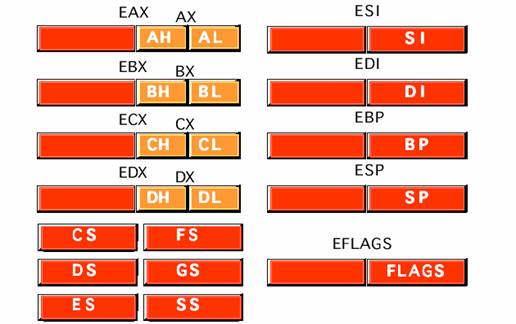
Since the processor accesses registers more quickly than it accesses memory, you can make your programs run faster by keeping the most-frequently used data in registers.
Typical Uses of General-Purpose Registers
| Register | Size | Typical Uses |
|---|---|---|
| EAX | 32-bit | Accumulator for operands and results |
| EBX | 32-bit | Base pointer to data in the data segment |
| ECX | 32-bit | Counter for loop operations |
| EDX | 32-bit | Data pointer and I/O pointer |
| EBP | 32-bit | Frame Pointer - useful for stack frames |
| ESP | 32-bit | Stack Pointer - hardcoded into PUSH and POP operations |
| ESI | 32-bit | Source Index - required for some array operations |
| EDI | 32-bit | Destination Index - required for some array operations |
| EIP | 32-bit | Instruction Pointer |
| EFLAGS | 32-bit | Result Flags - hardcoded into conditional operations |
x86 Registers
Four 32-bit registers can be used as- Four 32-bit registers EAX, EBX, ECX, EDX.
- Four 16-bit registers AX, BX, CX, DX.
- Eight 8-bit register AH, AL, BH, BL, CH, CL, DH, DL.
Some registers have special use...
- ...ECX for count in LOOP and REPeatable instructions

x86 Registers, Cont
|

x86 Control Registers
EIP Program counter (Instruction Pointer)EFLAGS is set of bit flags:
- Status flags record status information about the result of the last arithmetic/logical instruction.
- Direction flag stores forward/backward direction for data copying.
- System flags store
- IF interrupt-enable mode
- TF Trap flag used in single-step debugging.
- IF interrupt-enable mode
MOV, Data Transfer Instructions
The MOV instruction copies the source operand to the destination operand without affecting the source.Five types of operand combinations are allowed with MOV:
    Instruction type             Example
    --------------------------   ------------------
    mov   register, register     mov   DX,  CX
    mov   register, immediate    mov   BL,  100
    mov   register, memory       mov   EBX, [count]
    mov   memory, register       mov   [count], ESI
    mov   memory, immediate      mov   [count], 23
Note: the above operand combinations are valid for all instructions that require two operands.
Ambiguous MOVes: PTR and OFFSET
For the following data definitions.DATA
table1 DW 20 DUP (?)
status DB 7 DUP (0)
.CODE
mov EBX, table1 ; "instruction operands must be the same size"
mov ESI, status ; "instruction operands must be the same size"
mov [EBX], 100 ; "invalid instruction operands"
mov [ESI], 100 ; "invalid instruction operands"
The above MOV instructions are ambiguous.
Not clear whether the assembler should use byte or word equivalent of 100.
Better:
        mov    EBX, OFFSET table1
        mov    ESI, OFFSET status
        mov    WORD PTR [EBX], 100
        mov    BYTE PTR [ESI], 100
INC and DEC Arithmetic Instructions
Format:inc destination
dec destination
Semantics:
destination = destination +/- 1
The destination can be 8-bit, 16-bit, or 32-bit operand, in memory or in register.
No immediate operand is allowed.
Examples:
    inc    BX       ; BX = BX + 1
    dec    [value]  ; value = value - 1
ADD Arithmetic Instruction
Format:add destination, source
Semantics:
destination = (destination) + (source)
Examples:
    add    ebx,eax
    add    [value], 10h
ADD vs. INC
Note thatinc eaxis better than
add eax, 1
INC takes less space.
Both INC and ADD execute at about the same speed.
SUB Arithmetic Instruction
Format:sub destination, source
Semantics:
destination = (destination) - (source)
Examples:
    sub     ebx, eax
    sub     [value], 10h
SUB vs. DEC
Note thatdec eaxis better than
sub eax, 1
DEC takes less space.
Both execute at about the same speed.
CMP instruction
Format:cmp destination, source
Semantics:
(destination) - (source)
The destination and source are not altered.
Useful to test relationship such as < > or = between the two operands.
Used in conjunction with conditional jump instructions for decision making purposes.
Examples:
        cmp ebx, eax
        je  done      ; jump if equal
        ..
    done:
        ..
Unconditional Jumps
Format:jmp label
Semantics:
- Execution is transferred to the instruction identified by the label.
- Infinite loop example:
        mov    eax, 1
    inc_again:
        inc    eax
        jmp    inc_again
        mov    ebx, eax    ; this will never execute...
Conditional Jumps
Format:jcondition label
Semantics:
- Execution is transferred to the instruction identified by label only if condition is met.
- Testing for carriage return example:
        ; Assume that AL contains input character.
        cmp    al, 0dh  ; 0dh = ASCII carriage return
        je     CR_received
        inc    cl
        ..
    CR_received:
Conditional Jumps, Cont
Some conditional jump instructions treat operands of the CMP instruction as signed numbers:je jump if equal
jg jump if greater
jl jump if less
jge jump if greater or equal
jle jump if less or equal
jne jump if not equal
Conditional Jumps, Cont
Some conditional jump instructions can also test values of the individual CPU flags:
    jz     jump if zero      (ZF = 1)
    jnz    jump if not zero  (ZF = 0)
    jc     jump if carry     (CF = 1)
    jnc    jump if not carry (CF = 0)

    jz     is synonymous for je
    jnz    is synonymous for jne
LOOP Instruction
Format:
loop target
Semantics:
- Decrements ECX and jumps to target, if ECX > 0
- ECX should be loaded with a loop count value before loop begins.
|
|
|
Logical Instructions
Format:
    and  destination, source
    or   destination, source
    xor  destination, source
    not  destination
Semantics:
- Perform the standard bitwise logical operations.
- Result goes to the destination.
TEST is a non-destructive AND instruction:
test destination, source
TEST performs logical AND but the result is not stored in destination (similar to CMP instruction.)
Logical Instructions, Cont.
Example of testing the value in AL for odd/even number:
        test  al, 01h  ; test the least significant bit
        je    even_number
    odd_number:
        ; process odd number
        ..
        jmp   next
    even_number:
        ; process even number
        ..
    next:
Shift Instructions
Shift left format:shl destination, count
shl destination, cl
Shift right format:
shr destination, countwhere count is an immediate value.
shr destination, cl
Semantics:
- Performs left/right bit-shift of destination by the value in count or CL register.
- CL register contents is not altered.
SHL and SHR Shift Instructions
Bit shifted out goes into the carry flag CF.Zero bit is shifted in at the other end:


Shift Instructions Examples
Count is an immediate value:
shl eax, 5
Specification of count greater than 31 is not allowed.
If greater, only the least significant 5 bits are actually used.
CL version of shift is useful if shift count is known at run time,
- e.g. when the shift count is a parameter in a procedure call.
Only CL register can be used.
Shift count value should be loaded into CL:
    mov    cl, 5
    shl    ax, cl
Rotate Instructions
Two types of rotate instructions:
- Rotate without carry:
- ROL (ROtate Left)
- ROR (ROtate Right)
- ROL (ROtate Left)
- Rotate with carry:
- RCL (Rotate through Carry Left)
- RCR (Rotate through Carry Right)
- RCL (Rotate through Carry Left)
Rotate instruction operand is similar to shift instructions and supports two versions:
- Immediate count value
- Count value is in CL register
ROL and ROR, Rotate Without Carry


RCL and RCR, Rotate With Carry


EQU directive
EQU directive eliminates hardcoding:
    NUM_OF_STUDENTS  EQU   90
    ..
    mov ecx, NUM_OF_STUDENTS
No reassignment is allowed.
Only numeric constants are allowed.
Defining constants has two main advantages:
- Improves program readability
- Helps in software maintenance.
mov ecx, 90 ; HARDCODING is less readable and harder to maintain
Multiple occurrences can be changed from a single place
The convention is to use all UPPER-CASE LETTERS for names of constants.
EQU Directive Syntax
name EQU expression
Assigns the result of expression to name.
The expression is evaluated at assembly time.
More examples:
    NUM_OF_ROWS   EQU   50

    NUM_OF_COLS   EQU   10

    ARRAY_SIZE    EQU   NUM_OF_ROWS * NUM_OF_COLS
Assembly Language
.386                ; Tells MASM to use Intel 80386 instruction set.
.MODEL FLAT         ; Flat memory model
option casemap:none ; Treat labels as case-sensitive
Subscribe to:
Posts (Atom)