Getting Started with Simple wso2 ESB EJB Mediator Sample


The EJB mediator calls an external Enterprise JavaBean(EJB) and stores the result in the message payload or in a message context property. Currently, this mediator supports EJB3 Stateless Session Beans and Stateful Session Beans.

Before Start first look what is EJB Mediator and what is EJB now Let's see how to Run a Simple Hello Name using EJB Mediator. in order to run the the sample we need to configure our Environment So the Requirements are
In the context of EJB the the implementation is focused on statefull and stateless session beans, so later when dicussing the sample scenarios and will dig in to the details on how to configure those with the WSO2 Ejb mediator
So let us now focus now on configuring EJB service invocation with WSO2 ESB.

Configure the ESB

  • Please download Jboss 7(jboss-as-7.1.1.Final Latest)  we do have test this with different application servers but for this demonstration we will be using Jboss 7 there you need to  copy jboss-client.jar to ESB_HOME/repository/components/lib
  • Please find the HelloName.jar (Ejb service) you will be find the HelloName  jar attached with this article (will discuss what this demo service and its implementation separately) please copy the HelloName.jar file to  JBOSS_HOME/standalone/deployments/  and  ESB_HOME/repository/components/lib
  • As next step you may have to configure AS connection properties and the you will be able define them in  synapse.properties (ESB_HOME/repository/conf ) it has following properties which is required to communicate with the AS,depending on the application server which you may use the configuration parameteres might get change, the following is required when you need to connect EJB services hosted in Jboss AS 7
  • Start ESB and Jboss AS

Configure Ejb Mediator for stateless bean

Idea of this demo such as when requests closest location he has to pass the name and  in this scenario when the requests comes first we need to invoke the sayHello method which is exposed as EJB service, and to invoke the method it requires to check HelloWorld so it we picking the name and pass it to ejb Container and the return result will be assign to the synapse property context  and using enrich mediator we can transform the incoming request as requires by the source, let see how this can be configured in ESB level

ejb Proxy

<?xml version="1.0" encoding="UTF-8"?>
<proxy xmlns="http://ws.apache.org/ns/synapse"
name="ejb"
transports="https,http"
statistics="disable"
trace="disable"
startOnLoad="true">
<target>
<inSequence>
<property name="response" value="init" scope="default" type="STRING"/>
<log level="custom">
<property name="response" value="{//name}"/>
</log>
<ejb beanstalk="jack"
class="org.NewBeanRemote"
method="sayHello"
target="response"
jndiName="ejb:/EJBModule3/NewBean!org.NewBeanRemote">
<args>
<arg xmlns:m="http://org" value="{//m:name}"/>
</args>
</ejb>
<payloadFactory media-type="xml">
<format>
<ejb xmlns="">
<response>$ctx.response</response>
</ejb>
</format>
<args/>
</payloadFactory>
<respond/>
</inSequence>
</target>
<description/>
</proxy>

in above proxy we need to set beanstalk , class, method, target and  jndiName we already looked about these parameters in previous post about EJB Mediator. here my beanstalk id is jack bu we can set unique id for that the important thing is we are going to use this name in synapse properties to set the property values. my class name is org.NewBeanRemote and method name is sayHello . the value which my method returning is naming as response in target finally we can catch the jndi name from JBoss server console.

synapse property

synapse.beanstalks=jack
synapse.beanstalks.jack.java.naming.factory.url.pkgs=org.jboss.ejb.client.naming
synapse.beanstalks.jack.cache.warn.limit.stateless=5
synapse.beanstalks.jack.cache.warn.limit.stateful=5
synapse.beanstalks.jack.cache.timeout.stateless=1
synapse.beanstalks.jack.cache.timeout.stateful=1
after  set the synapse properties value we will sent the below request to the proxy which we create as ejb.

Soap Request

<soapenv:Envelope xmlns:soapenv="http://schemas.xmlsoap.org/soap/envelope/">
<soapenv:Body>
<sayHello xmlns="http://org">
<name>rajjaz</name>
</sayHello>
</soapenv:Body>
</soapenv:Envelope> 

 if everything success you will get bellow response to your soap Request

Soap Response

<soapenv:Envelope xmlns:soapenv="http://schemas.xmlsoap.org/soap/envelope/">
<soapenv:Body>
<ejb>
<response>Hello rajjaz</response>
</ejb>
</soapenv:Body>
</soapenv:Envelope>

Debug Log


[2015-10-09 10:39:09,699] DEBUG - wire >> "POST /services/ejb.ejbHttpSoap11Endpoint HTTP/1.1[\r][\n]"
[2015-10-09 10:39:09,700] DEBUG - wire >> "Accept-Encoding: gzip,deflate[\r][\n]"
[2015-10-09 10:39:09,700] DEBUG - wire >> "Content-Type: text/xml;charset=UTF-8[\r][\n]"
[2015-10-09 10:39:09,700] DEBUG - wire >> "SOAPAction: "urn:mediate"[\r][\n]"
[2015-10-09 10:39:09,701] DEBUG - wire >> "Content-Length: 201[\r][\n]"
[2015-10-09 10:39:09,701] DEBUG - wire >> "Host: rajjaz-ThinkPad-T540p:8280[\r][\n]"
[2015-10-09 10:39:09,701] DEBUG - wire >> "Connection: Keep-Alive[\r][\n]"
[2015-10-09 10:39:09,702] DEBUG - wire >> "User-Agent: Apache-HttpClient/4.1.1 (java 1.5)[\r][\n]"
[2015-10-09 10:39:09,702] DEBUG - wire >> "[\r][\n]"
[2015-10-09 10:39:09,702] DEBUG - wire >> "<soapenv:Envelope xmlns:soapenv="http://schemas.xmlsoap.org/soap/envelope/">[\n]"
[2015-10-09 10:39:09,702] DEBUG - wire >> " <soapenv:Body>[\n]"
[2015-10-09 10:39:09,702] DEBUG - wire >> " <sayHello xmlns="http://org">[\n]"
[2015-10-09 10:39:09,702] DEBUG - wire >> "<name>rajjaz</name>[\n]"
[2015-10-09 10:39:09,702] DEBUG - wire >> " </sayHello>[\n]"
[2015-10-09 10:39:09,702] DEBUG - wire >> " </soapenv:Body>[\n]"
[2015-10-09 10:39:09,703] DEBUG - wire >> "</soapenv:Envelope>"
[2015-10-09 10:39:09,707] DEBUG - ProxyServiceMessageReceiver Proxy Service ejb received a new message from : 127.0.0.1
[2015-10-09 10:39:09,708] DEBUG - ProxyServiceMessageReceiver Message To: /services/ejb.ejbHttpSoap11Endpoint
[2015-10-09 10:39:09,708] DEBUG - ProxyServiceMessageReceiver SOAPAction: urn:mediate
[2015-10-09 10:39:09,708] DEBUG - ProxyServiceMessageReceiver WSA-Action: urn:mediate
[2015-10-09 10:39:09,708] DEBUG - ProxyService Setting default fault-sequence for proxy
[2015-10-09 10:39:09,708] DEBUG - ProxyServiceMessageReceiver Using the anonymous in-sequence of the proxy service for mediation
[2015-10-09 10:39:09,708] DEBUG - SequenceMediator Start : Sequence <anonymous>
[2015-10-09 10:39:09,708] DEBUG - SequenceMediator Sequence <SequenceMediator> :: mediate()
[2015-10-09 10:39:09,708] DEBUG - SequenceMediator Mediation started from mediator position : 0
[2015-10-09 10:39:09,708] DEBUG - SequenceMediator Building message. Sequence <SequenceMediator> is content aware
[2015-10-09 10:39:09,709] DEBUG - PropertyMediator Start : Property mediator
[2015-10-09 10:39:09,709] DEBUG - PropertyMediator Setting property : response at scope : default to : init (i.e. constant : init)
[2015-10-09 10:39:09,709] DEBUG - PropertyMediator End : Property mediator
[2015-10-09 10:39:09,709] DEBUG - LogMediator Start : Log mediator
[2015-10-09 10:39:09,709] INFO - LogMediator response = {//name}
[2015-10-09 10:39:09,710] DEBUG - LogMediator End : Log mediator
[2015-10-09 10:39:09,933] DEBUG - PayloadFactoryMediator #mediate. Transformed payload format>>> <pfPadding><ejb><response>Hello rajjaz</response></ejb></pfPadding>
[2015-10-09 10:39:09,933] DEBUG - RespondMediator Start : Respond Mediator
[2015-10-09 10:39:09,940] DEBUG - RespondMediator End : Respond Mediator
[2015-10-09 10:39:09,940] DEBUG - SequenceMediator End : Sequence <anonymous>
[2015-10-09 10:39:09,941] DEBUG - wire << "HTTP/1.1 200 OK[\r][\n]"
[2015-10-09 10:39:09,941] DEBUG - wire << "Host: rajjaz-ThinkPad-T540p:8280[\r][\n]"
[2015-10-09 10:39:09,941] DEBUG - wire << "SOAPAction: "urn:mediate"[\r][\n]"
[2015-10-09 10:39:09,941] DEBUG - wire << "Accept-Encoding: gzip,deflate[\r][\n]"
[2015-10-09 10:39:09,941] DEBUG - wire << "Content-Type: text/xml;charset=UTF-8; charset=UTF-8[\r][\n]"
[2015-10-09 10:39:09,941] DEBUG - wire << "Date: Fri, 09 Oct 2015 05:09:09 GMT[\r][\n]"
[2015-10-09 10:39:09,941] DEBUG - wire << "Transfer-Encoding: chunked[\r][\n]"
[2015-10-09 10:39:09,941] DEBUG - wire << "Connection: Keep-Alive[\r][\n]"
[2015-10-09 10:39:09,941] DEBUG - wire << "[\r][\n]"
[2015-10-09 10:39:09,941] DEBUG - wire << "ce[\r][\n]"
[2015-10-09 10:39:09,941] DEBUG - wire << "<?xml version='1.0' encoding='UTF-8'?><soapenv:Envelope xmlns:soapenv="http://schemas.xmlsoap.org/soap/envelope/"><soapenv:Body><ejb><response>Hello rajjaz</response></ejb></soapenv:Body></soapenv:Envelope>[\r][\n]"
[2015-10-09 10:39:09,941] DEBUG - wire << "0[\r][\n]"
[2015-10-09 10:39:09,941] DEBUG - wire << "[\r][\n]"

References

WSO2 ESB EJB Mediator

The EJB mediator calls an external Enterprise JavaBean(EJB) and stores the result in the message payload or in a message context property. Currently, this mediator supports EJB3 Stateless Session Beans and Stateful Session Beans.


 Syntax


<ejb beanstalk="string" class="string" [sessionId="string"] [remove="true | false"] 
[method="string"] [target="string | {xpath}"] [jndiName="string"] />
<args>
<arg (value="string | {xpath}")/>*
</args>
</ejb>

This is how EJB Mediator will be in proxy

Parameter Name
Description
Add ArgumentCan be used to define the arguments which is required for the particular ejb method to be invoked Expression/Value. 
Beanstalk IDReference to the application server specific connection source information, which is defined at the synapse.properties.
ClassThis required the remote interface definition provided in the EJB 3.0 (EJB service invocation remote/home interface).
JNDI NameThe Java Naming and Directory Interface (JNDI) is an application programming interface (API) for accessing different kinds of naming and directory services. JNDI is not specific to a particular naming or directory service. It can be used to access many different kinds of systems including file systems; distributed objects systems such as CORBA, Java RMI, and EJB; and directory services such as LDAP, Novell NetWare, and NIS+.
RemoveThis parameter specifies whether the Enterprise Entity Manager should remove the EJB context related parameters once the state full/stateless session is invoked.
Session IDWhen the EJB context is invoked in the form state-full bean then the related ejb session status specified will be stored in here. Possible values are as follows.
  • Value: If this is selected, the session ID can be entered as a static value.
  • Expression: If this is selected, an XPath expression can be entered to evaluate the session ID.
TargetIf a particular EJB method returns, then the return object can be saved against the the name provided in the target at the synapse property context.
 

Sample ejb Syntax

    <ejb beanstalk="rajjaz"
class="org.NewBeanRemote"
method="sayHello"
target="response"
jndiName="ejb:/EJBModule3/NewBean!org.NewBeanRemote">
<args>
<arg xmlns:m="http://org" value="{//m:name}"/>
</args>
</ejb>

above one is the sample catch the value come as name and pass it to the method sayHello in ejb class JNDI Named as NewBeanRemote then it will catch the output come within response tag.

the values for the JNDI Properties will be set the Synapse.properties

Synapse.properties


synapse.beanstalks=rajjaz
synapse.beanstalks.rajjaz.java.naming.factory.url.pkgs=org.jboss.ejb.client.naming
synapse.beanstalks.rajjaz.cache.warn.limit.stateless=5
synapse.beanstalks.rajjaz.cache.warn.limit.stateful=5
synapse.beanstalks.rajjaz.cache.timeout.stateless=1
synapse.beanstalks.rajjaz.cache.timeout.stateful=1 

lets discuss how to run helloworld sample using WSO2 ESB ejb mediator in next post

Source code

References

Getting Started with Simple Remote EJB 3.X Server Sample

This sample will give you a simple working experience with EJB client server . here I’m using netbeans as IDE and JBoss 5.1 as my EJB Container. and I created seperate client for Stateful an Stateless EJB sessions  in order to make easy the development .We'll create a ejb module project named EJBTestServer.


1. In NetBeans IDE, select ,File > New Project Select project type under category,Java EE, Project type as Ejb Module. Click Next > button. Enter project name as EJBTestServer and location. Click Next > button.


Select Server as JBoss Application Server. Click Finish button.


above step will give the simple skeleton for the ejb project. our next step is to add the beans to ejb so lets create a Session Bean.

Create a sample EJB

To create a simple EJB, we'll use NetBeans "New" wizard. In example below, We'll create a stateless ejb class named NewSessionBean under EJBTestServer  project. Select project EJBTestServer in project explorer window and right click on it. Select, New > Session Bean.


Enter session bean name and package name. Click Finish button. You'll see the following ejb classes created by NetBeans.
  • NewSessionBean - stateless session bean
  • NewSessionBeanLocal - local interface for session bean
I am changing local interface to remote interface as we're going to access our ejb in a console based application. Remote/Local interface are used to expose business methods that an ejb has to implement.

NewSessionBeanLocal is renamed to NewSessionBeanRemote and NewSessionBean implements NewSessionBeanRemote interface.

 NewSessionBeanRemote.java

package org1;

import javax.ejb.Remote;

/**
*
* @author rajjaz
*/
@Remote
public interface NewSessionBeanRemote {
public String display();
public String sayHello(String name);
}


NewSessionBean.java

package org1;

import javax.ejb.Stateless;

/**
*
* @author rajjaz
*/
@Stateless
public class NewSessionBean implements NewSessionBeanRemote {

// Add business logic below. (Right-click in editor and choose
// "Insert Code > Add Business Method")
public String display(){
return "Hello JBoss";
}
public String sayHello(String name){
this.count++;
return "Hello " + name;
}
}


Do the above way to create the bean for the Stateful Session also
  • NewStatefulSessionBean - stateful session bean
  • NewStatefulSessionBeanRemote - local interface for session bean

 NewStatefulSessionBeanRemote.java

package org1;

import javax.ejb.Remote;

/**
*
* @author rajjaz
*/
@Remote
public interface NewStatefulSessionBeanRemote {
void increment();

void decrement();

int getCount();
}

NewStatefulSessionBean.java

package org1;

import javax.ejb.Remote;
import javax.ejb.Stateful;

/**
*
* @author rajjaz
*/
@Stateful
@Remote(NewStatefulSessionBeanRemote.class)
public class NewStatefulSessionBean implements NewStatefulSessionBeanRemote {

// Add business logic below. (Right-click in editor and choose
// "Insert Code > Add Business Method")


private int count = 0;

@Override
public void increment() {
this.count++;
}

@Override
public void decrement() {
this.count--;
}

@Override
public int getCount() {
return this.count;
}
}


Now Right Click on project and click on Clean and Build then you will get the below output

ant -f /home/rajjaz/NetBeansProjects/EJBTestServer -Dnb.internal.action.name=rebuild clean dist
init:
undeploy-clean:
deps-clean:
Deleting directory /home/rajjaz/NetBeansProjects/EJBTestServer/build
Deleting directory /home/rajjaz/NetBeansProjects/EJBTestServer/dist
clean:
init:
deps-jar:
Created dir: /home/rajjaz/NetBeansProjects/EJBTestServer/build/classes
Copying 2 files to /home/rajjaz/NetBeansProjects/EJBTestServer/build/classes/META-INF
Created dir: /home/rajjaz/NetBeansProjects/EJBTestServer/build/empty
Compiling 4 source files to /home/rajjaz/NetBeansProjects/EJBTestServer/build/classes
compile:
library-inclusion-in-archive:
Created dir: /home/rajjaz/NetBeansProjects/EJBTestServer/dist
Building jar: /home/rajjaz/NetBeansProjects/EJBTestServer/dist/EJBTestServer.jar
dist:
BUILD SUCCESSFUL (total time: 0 seconds)


next to that deply the project. if project was successfully deployed you will get the below output

14:33:30,677 INFO  [EJBContainer] STARTED EJB: org1.NewSessionBean ejbName: NewSessionBean
14:33:30,680 INFO [JndiSessionRegistrarBase] Binding the following Entries in Global JNDI:

NewSessionBean/remote - EJB3.x Default Remote Business Interface
NewSessionBean/remote-org1.NewSessionBeanRemote - EJB3.x Remote Business Interface

14:33:30,693 INFO [SessionSpecContainer] Starting jboss.j2ee:jar=EJBTestServer.jar,name=NewStatefulSessionBean,service=EJB3
14:33:30,693 INFO [EJBContainer] STARTED EJB: org1.NewStatefulSessionBean ejbName: NewStatefulSessionBean
14:33:30,697 INFO [JndiSessionRegistrarBase] Binding the following Entries in Global JNDI:

NewStatefulSessionBean/remote - EJB3.x Default Remote Business Interface
NewStatefulSessionBean/remote-org1.NewStatefulSessionBeanRemote - EJB3.x Remote Business Interface

14:33:38,933 WARN [InterceptorsFactory] EJBTHREE-1246: Do not use InterceptorsFactory with a ManagedObjectAdvisor, InterceptorRegistry should be used via the bean container


That's all now our project was successfully deployed on Jboss Server our next step step is create simple client to test this server

Server Source Code

Create a simple Client

Getting Started with Simple RMI services

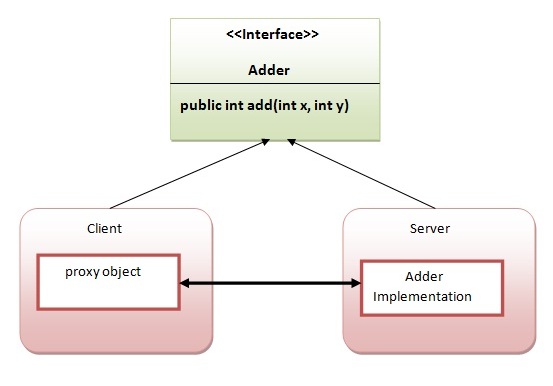
Writing your own RMI services can be a little difficult at first, so we'll start off with an example which isn't too ambitious.In this example, we have followed all the 6 steps to create and run the rmi application. The client application need only two files, remote interface and client application. In the rmi application, both client and server interacts with the remote interface. The client application invokes methods on the
proxy object, RMI sends the request to the remote JVM. The return value is sent back to the proxy object and then to the client application.

The is given the 6 steps to write the RMI program.

1.create the remote interface

An interface is a method which contains abstract methods; these methods must be implemented by another class.For creating the remote interface, extend the Remote interface and declare the RemoteException with all the methods of the remote interface. Here, we are creating a remote interface that extends the Remote interface.

import java.math.BigInteger;
import java.rmi.*;

//
// PowerService Interface
//
// Interface for a RMI service that calculates powers
//
public interface PowerService extends Remote
{
// Calculate the square of a number
public BigInteger square ( int number )
throws RemoteException;

// Calculate the power of a number
public BigInteger power ( int num1, int num2)
throws RemoteException;
}

2) Provide the implementation of the remote interface

Now provide the implementation of the remote interface. For providing the implementation of the Remote interface, we need to
  • Either extend the UnicastRemoteObject class,
  • or use the exportObject() method of the UnicastRemoteObject class
In case, you extend the UnicastRemoteObject class, you must define a constructor that declares RemoteException. Our implementation of the service also needs to have a main method. The main method will be responsible for creating an instance of our PowerServiceServer, and registering (or binding) the service with the RMI Registry. 
Now rmi services need to be hosted in a server process. The Naming class provides methods to get and store the remote object. The Naming class provides 5 methods.

  1. public static java.rmi.Remote lookup(java.lang.String) throws java.rmi.NotBoundException, java.net.MalformedURLException, java.rmi.RemoteException; it returns the reference of the remote object.
  2. public static void bind(java.lang.String, java.rmi.Remote) throws java.rmi.AlreadyBoundException, java.net.MalformedURLException, java.rmi.RemoteException; it binds the remote object with the given name.
  3. public static void unbind(java.lang.String) throws java.rmi.RemoteException, java.rmi.NotBoundException, java.net.MalformedURLException; it destroys the remote object which is bound with the given name.
  4. public static void rebind(java.lang.String, java.rmi.Remote) throws java.rmi.RemoteException, java.net.MalformedURLException; it binds the remote object to the new name.
  5. public static java.lang.String[] list(java.lang.String) throws java.rmi.RemoteException, java.net.MalformedURLException; it returns an array of the names of the remote objects bound in the registry.

import java.math.*;
import java.rmi.*;
import java.rmi.server.*;

//
// PowerServiceServer
//
// Server for a RMI service that calculates powers
//
public class PowerServiceServer extends UnicastRemoteObject
implements PowerService
{
public PowerServiceServer () throws RemoteException
{
super();
}

// Calculate the square of a number
public BigInteger square ( int number )
throws RemoteException
{
String numrep = String.valueOf(number);
BigInteger bi = new BigInteger (numrep);

// Square the number
bi.multiply(bi);

return (bi);
}

// Calculate the power of a number
public BigInteger power ( int num1, int num2)
throws RemoteException
{
String numrep = String.valueOf(num1);
BigInteger bi = new BigInteger (numrep);

bi = bi.pow(num2);

return bi;
}

public static void main ( String args[] ) throws Exception
{
// Create an instance of our power service server ...
PowerServiceServer svr = new PowerServiceServer();

// ... and bind it with the RMI Registry
Naming.bind ("PowerService", svr);

System.out.println ("Service bound....");
}
}


5) Create and run the client application

Writing clients is the easy part - all a client has to do is call the registry to obtain a reference to the remote object, and call its methods. At the client we are getting the stub object by the lookup() method of the Naming class and invoking the method on this object. All the underlying network communication is hidden from view, which makes RMI clients simple. In this example, we are running the server and client applications, You can run the client locally, or from a different machine. In either case, you'll need to specify the hostname of the machine where you are running the server. If you're running it locally, use localhost as the hostname.If you want to access the remote object from another machine, change the localhost to the host name (or IP address) where the remote object is located.

  To identify a service, we specify an RMI URL. The URL contains the hostname on which the service is located, and the logical name of the service. This returns a PowerService instance, which can then be used just like a local object reference. We can call the methods just as if we'd created an instance of the remote PowerServiceServer ourselves.


import java.rmi.*;
import java.rmi.Naming;
import java.io.*;


//
// PowerServiceClient
//

public class PowerServiceClient
{
public static void main(String args[]) throws Exception
{
// Check for hostname argument
if (args.length != 1)
{
System.out.println
("Syntax - PowerServiceClient host");
System.exit(1);
}


// Call registry for PowerService
PowerService service = (PowerService) Naming.lookup
("rmi://" + args[0] + "/PowerService");

DataInputStream din = new
DataInputStream (System.in);

for (;;)
{
System.out.println
("1 - Calculate square");
System.out.println
("2 - Calculate power");
System.out.println
("3 - Exit"); System.out.println();
System.out.print ("Choice : ");

String line = din.readLine();
Integer choice = new Integer(line);

int value = choice.intValue();

switch (value)
{
case 1:
System.out.print ("Number : ");
line = din.readLine();System.out.println();
choice = new Integer (line);
value = choice.intValue();

// Call remote method
System.out.println
("Answer : " + service.square(value));

break;
case 2:
System.out.print ("Number : ");
line = din.readLine();
choice = new Integer (line);
value = choice.intValue();

System.out.print ("Power : ");
line = din.readLine();
choice = new Integer (line);
int power = choice.intValue();

// Call remote method
System.out.println
("Answer : " + service.power(value, power));

break;
case 3:
System.exit(0);
default :
System.out.println ("Invalid option");
break;
}
}
}
}

Steps To Test

1) compile all the java files 

javac *.java  
 
2)create stub and skeleton object by rmic tool 
 
rmic PowerServiceServer 
 
3)start rmi registry in one command prompt 
 
rmiregistry 5000  
 
4)start the server in another command prompt 
 
java PowerServiceServer 
 
5)start the client application in another command prompt 
 
java PowerServiceClient localhost 


Output


References

JAVA Remote Method Invocation (RMI)

Remote method invocation allows applications to call object methods located remotely, sharing resources and processing load across systems. Unlike other systems for remote execution which require that only simple data types or defined structures be passed to and from methods, RMI allows any Java object type to be used - even if the client or server has never encountered it before. RMI allows both client and server to dynamically load new object types as required.

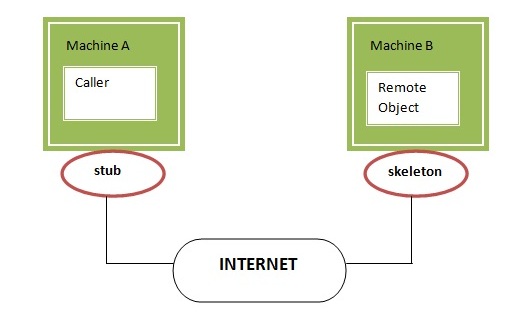
RMI uses stub and skeleton object for communication with the remote object.
A remote object is an object whose method can be invoked from another JVM. JVMs can be located on separate computers - yet one JVM can invoke methods belonging to an object stored in another JVM. Methods can even pass objects that a foreign virtual machine has never encountered before, allowing dynamic loading of new classes as required. This is a powerful feature! Let's understand the stub and skeleton objects:

stub

The stub is an object, acts as a gateway for the client side. All the outgoing requests are routed through it. It resides at the client side and represents the remote object. When the caller invokes method on the stub object, it does the following tasks:
  1. It initiates a connection with remote Virtual Machine (JVM),
  2. It writes and transmits (marshals) the parameters to the remote Virtual Machine (JVM),
  3. It waits for the result
  4. It reads (unmarshals) the return value or exception, and
  5. It finally, returns the value to the caller.

skeleton

The skeleton is an object, acts as a gateway for the server side object. All the incoming requests are routed through it. When the skeleton receives the incoming request, it does the following tasks:
  1. It reads the parameter for the remote method
  2. It invokes the method on the actual remote object, and
  3. It writes and transmits (marshals) the result to the caller.

Consider the follow scenario :
  • Developer A writes a service that performs some useful function. He regularly updates this service, adding new features and improving existing ones.
  • Developer B wishes to use the service provided by Developer A. However, it's inconvenient for A to supply B with an update every time.


Java RMI provides a very easy solution! Since RMI can dynamically load new classes, Developer B can let RMI handle updates automatically for him. Developer A places the new classes in a web directory, where RMI can fetch the new updates as they are required.

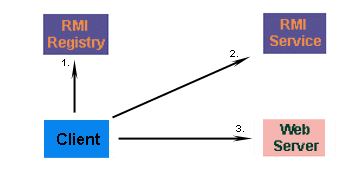
Firstly, the client must contact an RMI registry, and request the name of the service. Developer B won't know the exact location of the RMI service, but he knows enough to contact Developer A's registry. This will point him in the direction of the service he wants to call..

Developer A's service changes regularly, so Developer B doesn't have a copy of the class. Not to worry, because the client automatically fetches the new subclass from a webserver where the two developers share classes. The new class is loaded into memory, and the client is ready to use the new class. This happens transparently for Developer B - no extra code need to be written to fetch the class.

References

Study About Enterprise Java Beans (EJB) Introduction

Enterprise Java Beans (EJB) is a development architecture for building highly scalable and robust enterprise level applications to be deployed on J2EE compliant Application Server such as JBOSS, Web Logic etc.

A recent study by Java developer Raghu Kodali has shown that porting Sun's Java EE tutorial application RosterApp from EJB 2.1 to EJB 3.0 resulted in
more than a 50-percent reduction in code and The development of EJB 3 is faster than EJB 2 because of simplicity and annotations such as @EJB, @Stateless, @Stateful, @ModelDriven, @PreDestroy, @PostConstruct etc.

An EJB application can be deployed on any of the application server such as Jboss, Glassfish, Weblogic, Websphere etc compliant with J2EE 1.3 standard specification.It performs:
  • life cycle management,
  • security,
  • transaction management, and
  • object pooling.
EJB are primarily of three types which are briefly described below:

TypeDescription
Session BeanSession bean contains business logic that can be invoked by local, remote or web service client. It can be stateful or stateless. It is less resource intensive as compared to entity beans. Session bean gets destroyed as soon as user session terminates.
Entity BeanEntity beans represents persistent data storage. User data can be saved to database via entity beans and later on can be retrieved from the database in the entity bean.It is deprecated. Now, it is replaced with JPA (Java Persistent API).
Message Driven BeanMessage driven beans are used in context of JMS (Java Messaging Service). Message Driven Beans can consumes JMS messages from external entities and act accordingly.


References

WSO2 ESB Mediator

Mediators provide an easy way of extending the ESB functionalities. WSO2 ESB is based on the WSO2 Carbon platform, which uses OSGI as the underlying technology. It implies everything that runs inside the WSO2 ESB to be OSGI bundles.


There are two ways of writing the ESB mediator:
When adding a mediator to a sequence, you can configure the mediator in design view or in source view, which allows you to edit the source XML (different mediators have their own XML configurations).

The message content is accessed by some mediators in some mediation scenarios while it is not accessed in the other scenarios. Mediators can be classified as follows based on this aspect.
  • Content-aware mediators: These mediators always access the message content when mediating messages (e.g., Enrich mediator).
  • Content-unaware mediators: These mediators never access the message content when mediating messages (e.g., Send mediator).
  • Conditionally content-aware mediators: These mediators could be either content-aware or content-unaware depending on their exact instance configuration. For an example a simple Log Mediator instance (i.e. configured as <log/>) is content-unaware. However a log mediator configured as <log level=”full”/> would be content-aware since it is expected to log the message payload.

    Mediators are considered to be one of the main mechanisms for extending an ESB. You can write a custom mediator and add it to the ESB. This custom mediator and any other built-in mediator will be exactly the same as the API and the privileges.
    The standard mediators in WSO2 ESB are listed in the table below. Click a link for details on that mediator. There are also many samples that demonstrate how to use mediators.

    The Mediator Catalog

    Category
    Name
    Description
    CoreCallInvoke a service in non blocking synchronous manner
    EnqueueUses a priority executor to ensure high-priority messages are not dropped
    SendSends a message
    LoopbackMoves the message from the In flow to the Out flow, skipping all remaining configuration in the In flow
    SequenceInserts a reference to a sequence
    RespondStops processing on the message and sends it back to the client
    EventSends event notifications to an event source, publishes messages to predefined topics
    DropDrops a message
    Call TemplateConstructs a sequence by passing values into a sequence template
    EnrichEnriches a message
    PropertySets or remove properties associated with the message
    LogLogs a message
    FilterFilterFilters a message using XPath, if-else kind of logic
    OutApplies to messages that are in the Out path of the ESB
    InApplies to messages that are in the In path of the ESB
    ValidateValidates XML messages against a specified schema.
    SwitchFilters messages using XPath, switch logic
    RouterRoutes messages based on XPath filtering
    Conditional RouterImplements complex routing rules (Header based routing, content based routing and other rules)
    TransformXSLTPerforms XSLT transformations on the XML payload
    FastXSLTPerforms XSLT transformations on the message stream
    URLRewriteModifies and rewrites URLs or URL fragments
    XQueryPerforms XQuery transformation
    HeaderSets or removes SOAP headers
    Fault (also called Makefault)Create SOAP Faults
    PayloadFactoryTransforms or replaces message content in between the client and the backend server
    AdvancedCacheEvaluates messages based on whether the same message came to the ESB
    ForEachSplits a message into a number of different messages by finding matching elements in an XPath expression of the original message.
    CloneClones a message
    StoreStores messages in a predefined message store
    IterateSplits a message
    AggregateCombines a message
    CalloutBlocks web services calls
    TransactionExecutes a set of mediators transactionally
    ThrottleLimits the number of messages
    DBReportWrites data to database
    DBLookupRetrieves information from database
    EJBCalls an external Enterprise JavaBean(EJB) and stores the result in the message payload or in a message context property.
    RuleExecutes rules
    EntitlementEvaluates user actions against a XACML policy
    OAuth2-legged OAuth support
    SmooksUsed to apply lightweight transformations on messages in an efficient manner.
    ExtensionBeanManipulates JavaBeans
    ClassCreates and executes a custom mediator
    POJOCommandExecutes a custom command
    ScriptExecutes a mediator written in Scripting language
    SpringCreates a mediator managed by Spring
    AgentBAMCaptures data events and sends them to the BAM server


    References